
Sold and rental comps, in one fetch.
One click pulls sold properties and rental listings within a 1-mile radius of the subject — filtered by bedrooms and property type, sorted by transaction date. Pick 3–10 to include in your report; the system computes a weighted valuation range adjusted for assessed bedrooms, floor area, construction age, condition and market direction. Render as a branded PDF appendix in any Level 2 or Level 3, or as a standalone comparable report.

How it works
From subject UPRN to valuation range.
Subject lookup
You enter the property address; we resolve to a UPRN against Land Registry and our property database, and pull the property record (bedrooms, type, floor area where known).
Comp fetch
Our property database returns sold properties (last 24 months by default) and rental listings within a 1-mile radius, filtered by bedrooms and property type. Configurable radius and time window.
Surveyor curation
You tick 3–10 comps, untick the ones that don't apply, set your assessed bedrooms / floor area / age / condition / market direction. Selection drives the weighted average.
Valuation + appendix
The weighted valuation range is calculated. The selected comps and your assessment render into a branded PDF appendix or a standalone comparable report PDF.
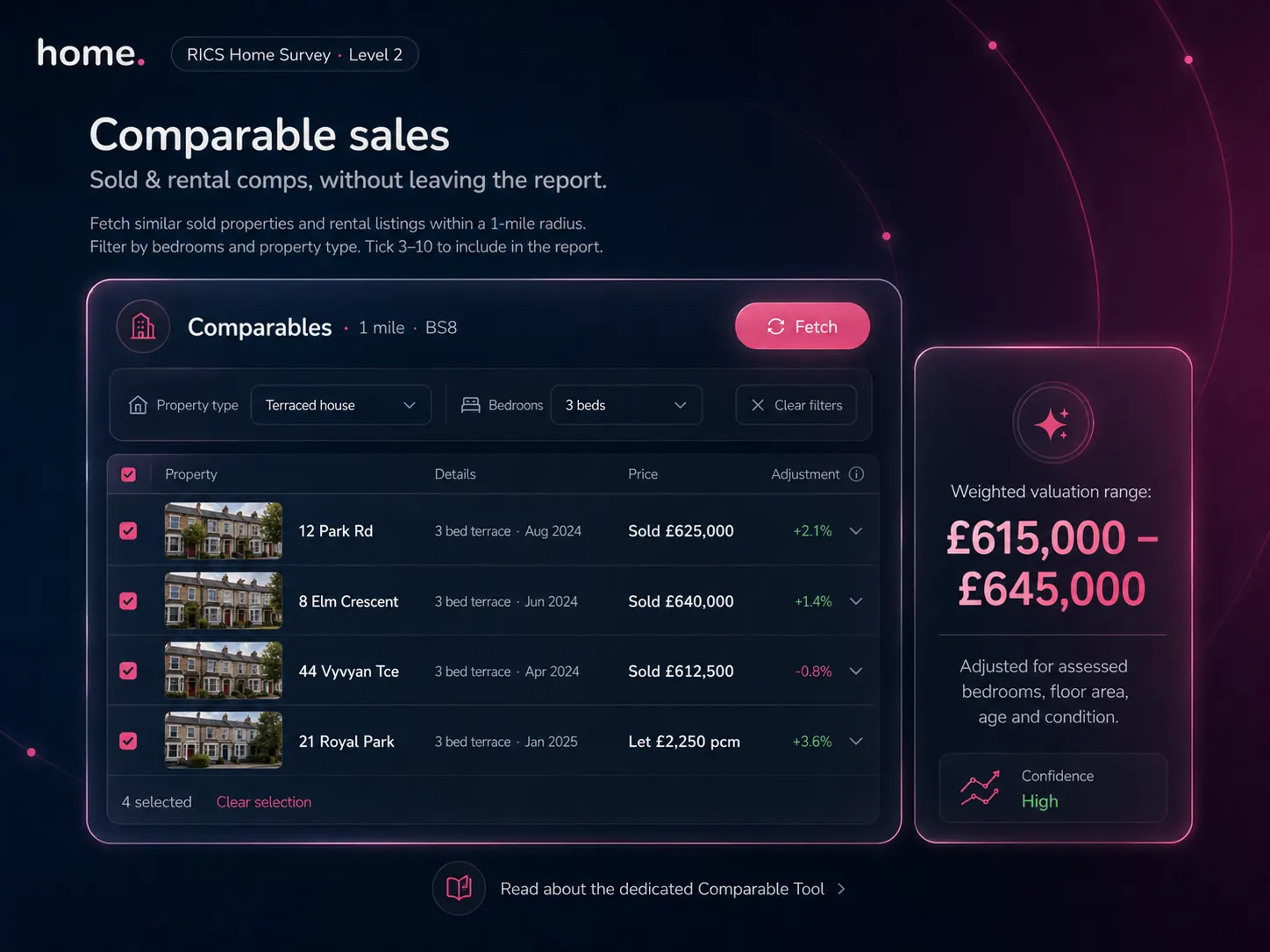
Inside the report
Comps live where you write.
The Comparable Tool isn't a separate site — it's a tab in every Level 2 and Level 3 report. Tick the comps that apply, set assessed bedrooms and floor area, and the weighted valuation range, the appendix and the surveyor narrative all update together. Everything stays inside one report, one PDF, one share link.
- ●Sold + rental comps in the same panel
- ●Branded PDF appendix or standalone valuation report
- ●Surveyor-curated 3–10 comp selection
- ●Adjusted weighted valuation range
Weighted valuation · explained
A range that shows its work.
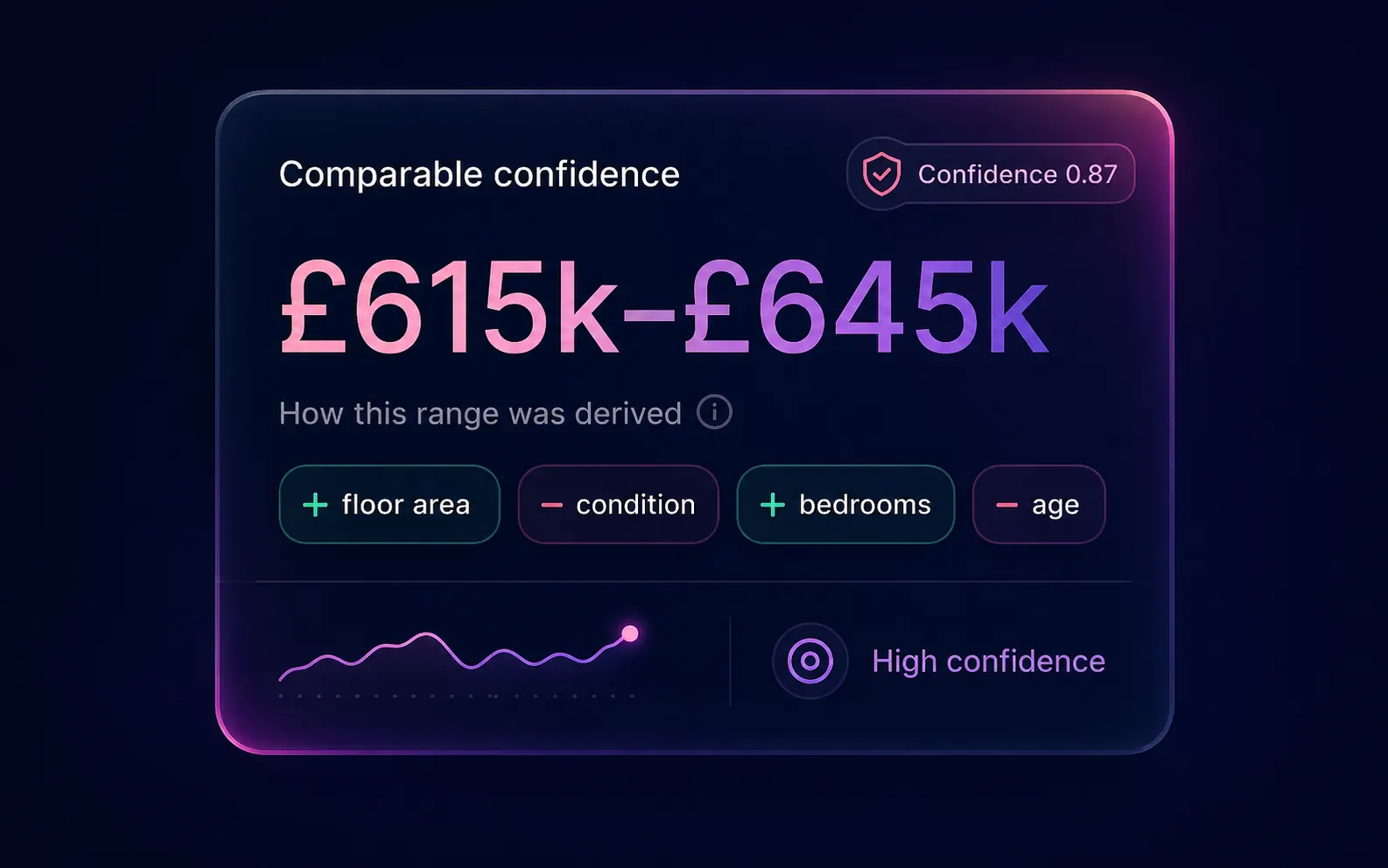
The valuation isn't a magic number. It's a weighted average of your selected comps adjusted for the surveyor-assessed bedrooms, floor area, age and condition. Every adjustment is shown as a chip — what raised the range, what lowered it — and the confidence score reflects comp density and consistency.
- +Floor area — subject larger than median comp
- −Condition — surveyor-assessed below median
- +Bedrooms — extra bedroom vs comp set
- −Age — older construction band
What you get
Beyond a quick portal screenshot
Sold & rental comparables
Both sale and rental comps shown in the same panel — useful for buy-to-let valuations and dual-purpose contexts.
12-month price trend
Postcode-level percentage change over the last 12 months with a volatility score, so the surveyor can flag whether the trend is reliable.
Weighted valuation range
Not a raw average. Weighted by your selection and adjusted for assessed bedrooms, floor area, construction age, condition rating and market direction (rising / flat / softening).
Bedroom & type filtering
Default filters mirror the subject; widen if needed (e.g. include 4-bed for a tight 3-bed market).
Image filtering
Furniture-only and irrelevant property images excluded so PDF appendices stay clean.
Editable in the report
You can override the suggested range, add notes per comp, and pin a comp as the primary reference.
Standalone or appendix
Run the tool standalone for valuation-only work, or embed as an appendix in any Level 2 / Level 3 report.
Source attribution
Every comp shows transaction date and source. You can include the appendix with or without surveyor notes.
Sources
Where the data comes from
HM Land Registry Price Paid Data, ingested daily and joined to the property graph by UPRN.
Aggregated agent rental listings normalised by bedrooms, property type and rent. Surfaced through our property database.
Active sale listings (asking prices) with floor area and bedroom counts where the agent has provided them. Useful as a forward-looking comp set.
Bedrooms, property type, build year, EPC floor area — from the property record that powers home.co.uk's public property pages.
FAQ
Questions about the comp tool
Where do the comparables come from?
From our property database — the same data that powers home.co.uk's sold-prices and rental-prices public pages. It aggregates HM Land Registry sold-prices, agent-listed rentals and active for-sale listings into a single property graph keyed by UPRN.
How is the valuation range calculated?
It's a weighted average of selected comp prices, adjusted for the surveyor-assessed bedrooms, floor area, construction age, condition and current market direction. The range is anchored on the comps you select — change your selection and the range recalculates.
Can the comparables go in a Level 2 or Level 3 report?
Yes. The Comparable Tool is integrated into the Level 2 and Level 3 report writers as the Comparables tab. Selected comps appear as an appendix in the final PDF. The same tool can also be run standalone for valuation-only instructions.
Can I change the search radius?
The default radius is 1 mile, which works for most urban subjects. For rural subjects, you can widen the radius to 3 or 5 miles. The system warns when comp density is low so you can flag this in the report.
How fresh is the data?
Land Registry sold prices are ingested daily — though Land Registry itself publishes with a 1–3 month lag, which is normal for sold-price comps. Rental listings refresh as agents publish; for-sale listings refresh in line with our property search.
Can I use the tool without writing a survey?
Yes. The Comparable Tool can run standalone for valuation-only instructions, mortgage referrals or pre-marketing appraisals. The output is a standalone branded PDF.
More tools
Explore the rest of the surveyor toolkit
Otto
AI auto-mode RICS report writer
Dictate on-site, upload photos, get a finished, fully-routed Level 2 or Level 3 report in minutes.
Level 2 Report Writer
RICS Home Survey Level 2
Field-by-field RICS Level 2 reports with inline AI suggestions, image gallery, comparables and one-click branded PDF.
Level 3 Report Writer
RICS Building Survey Level 3
Comprehensive Level 3 Building Survey reports with deep technical sections, custom rating scales and AI legal-adviser notes.
Snagging Report Builder
New-build defect tracker
Build professional new-build snagging lists with location-based defect tracking, photos, urgency, status and PDF export.
AI Dictation
Voice-to-fields routing
Speak observations on-site; AI routes every sentence to the correct RICS field with confidence scores and replayable audio.
Image AI
Auto-categorise survey photos
Upload up to 200 photos; vision AI tags each to the right RICS element, rates condition, extracts defects and picks the best 35 for the report.
Style Profile
Your firm's writing fingerprint
Teach the AI to write like your firm — upload past reports, the AI extracts a 25-dimension writing fingerprint and applies it to every future auto-mode report.
Property Viewer
Pre-survey property intelligence
Look up any UK property and instantly see EPC, energy renovation costs, broadband coverage, environmental risks (flood, radon, mining, landfill), invasive plants, sales history and listing status — all in one dashboard.
Property Data Drawer
EPC + risks + comps in one panel
Open the property data drawer in any report to see EPC, environmental risks, listing history and comparables — copy-paste ready.
Standard Phrases
Reusable language library
Personal, firm-wide and industry-preset phrase libraries — insert with one click and use to train AI routing for voice consistency.
RICS Standards Check
Home Survey Standard compliance pass
One-click AI compliance pass against the RICS Home Survey Standard — flags missing content, weak ratings and structural gaps before you sign the report.
Free directory listing. Pay-as-you-go toolkit.
Every RICS-regulated surveying firm gets a verified profile, direct bookings from home.co.uk consumers and the surveyor toolkit included with the account. No subscription. No pay-per-lead. No commission on the job. Pay only when you use the premium AI tools.
2 minute setup · Verified against the RICS register · Trusted UK property platform since 1995