
One pass. Catches what you missed.
A whole-report compliance pass against the RICS Home Survey Standard, 1st edition. Click run, get back a prioritised list of findings: missing content, ratings that don't match the language used, structural gaps, ambiguous wording. Every finding deep-links to the section to fix. You remain the surveyor of record — the check is advisory, not a gate.
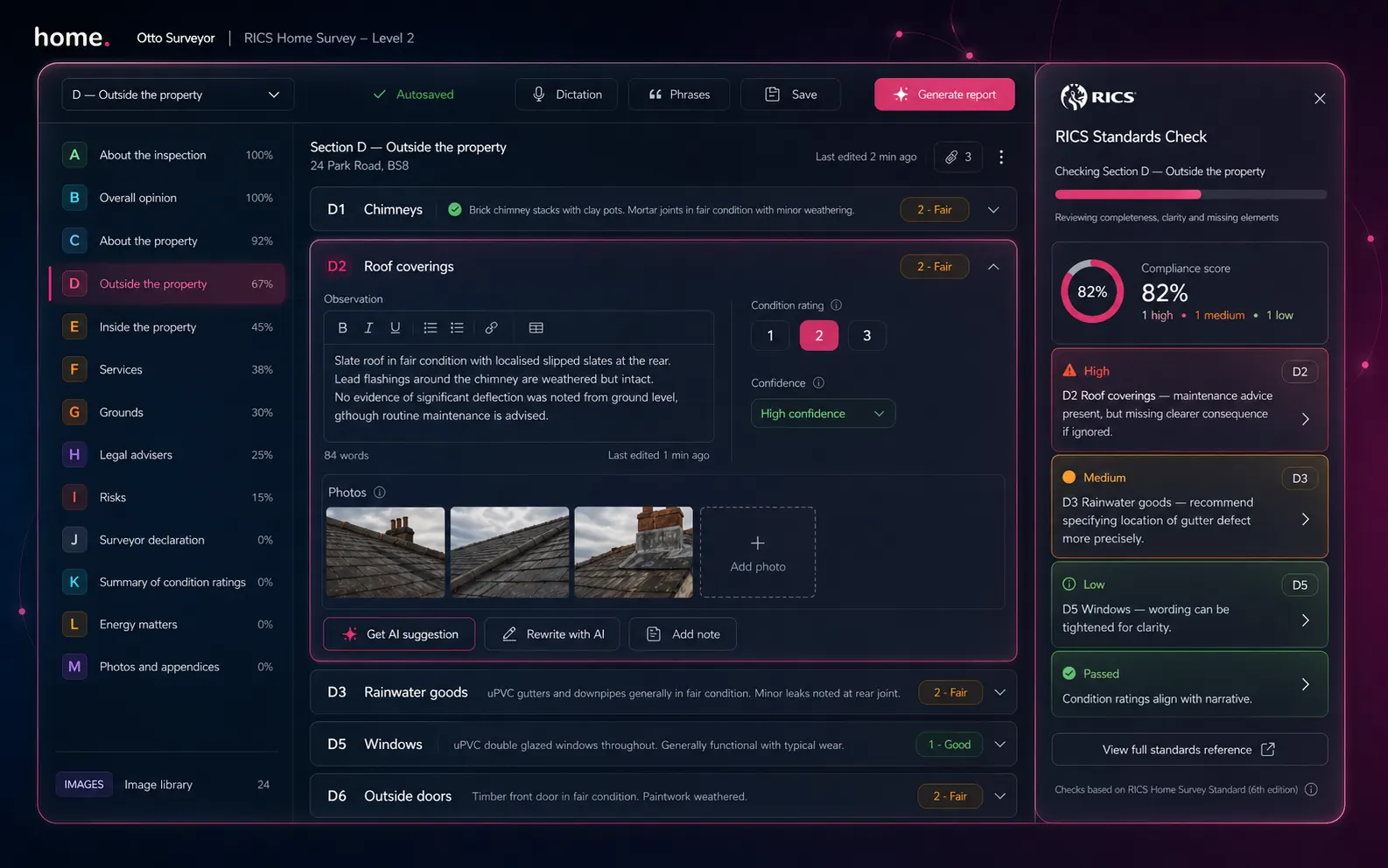
Four-axis pass
Content · Ratings · Structure · Language
Content depth
Every populated section is graded for adequate depth at the chosen level. Stub sections, single-line summaries on complex elements and missing risk commentary are surfaced.
Rating alignment
Condition ratings are cross-checked against the language of the commentary. A rating 3 with no "urgent" or "remedial" language — or a rating 1 alongside descriptions of significant defects — is flagged.
Structural completeness
Required sections for the report level are confirmed present. Level 2 expects sections A through K; Level 3 expects sections A through N including energy and remedial cost commentary.
Language & scope
First-person language, definitive opinions on specialist matters and scope-creep beyond the chosen survey level are flagged. The check keeps your wording observational and within remit.
Example finding
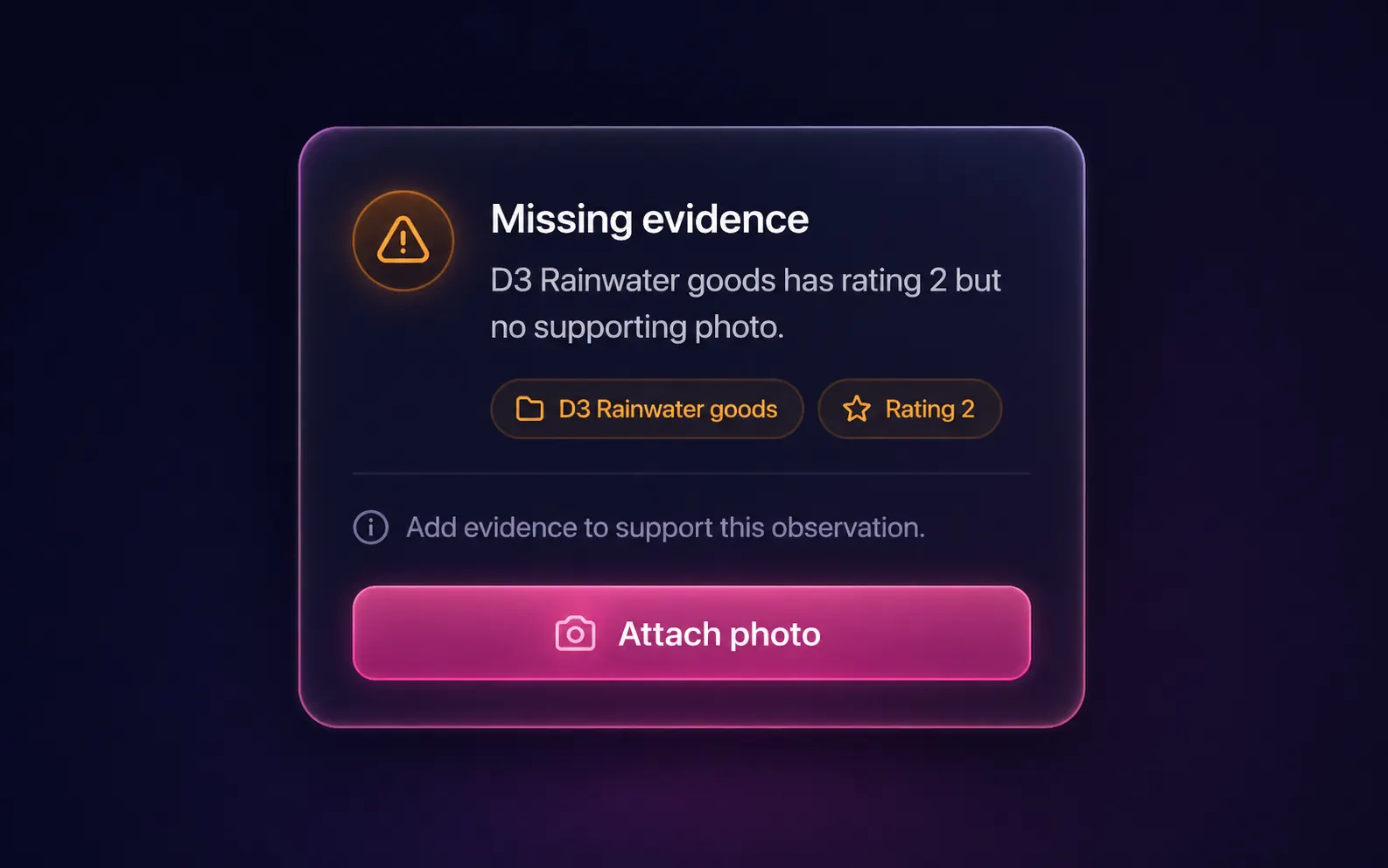
A typical critical: missing evidence.
One of the most common findings: an element rated 2 or 3 with no supporting photo. The pass surfaces it with the section, the rating and a one-tap "Attach photo" jump straight into the gallery filtered to that element. Fix it in seconds, not minutes.
- ●Severity-graded — critical, major, minor
- ●Deep-links to the section to fix
- ●One-click action where possible
- ●Run history per report
Where it fits
The last step before you sign.
Run Otto auto-mode to draft the report. Edit in the Level 2 or Level 3 report writer. Polish individual paragraphs with AI rewrite. Then run RICS Standards Check as the final pass — it scans the whole report in one go, ranks findings by severity and links each one back to the section to fix. Sign and export the branded PDF when you are happy.
Severity grading
Three priorities. No noise.
Every finding is graded so you know what to deal with first and what to ignore on a tight job.
A required section is missing, a condition rating directly contradicts the commentary, or wording goes beyond the surveyor's remit at this level. Fix before sign-off.
A section is significantly thin for the chosen level, a known risk for the property type is not addressed, or a finding from one section is not reflected in the overall opinion. Worth addressing before delivery.
Optional fields populated inconsistently, single sentences that could be expanded, or stylistic variations between sections. Nice-to-have improvements.
FAQ
Common questions
What does the RICS Standards Check actually check?
Does it work on Level 2 and Level 3 reports?
Can it block a report from being signed off?
Is the analysis stored or kept private?
How is this different from AI rewrite inside the editor?
Does the check use my style profile?
More tools
Explore the rest of the surveyor toolkit
Otto
AI auto-mode RICS report writer
Dictate on-site, upload photos, get a finished, fully-routed Level 2 or Level 3 report in minutes.
Level 2 Report Writer
RICS Home Survey Level 2
Field-by-field RICS Level 2 reports with inline AI suggestions, image gallery, comparables and one-click branded PDF.
Level 3 Report Writer
RICS Building Survey Level 3
Comprehensive Level 3 Building Survey reports with deep technical sections, custom rating scales and AI legal-adviser notes.
Surveyor Comparable Tool
Sold + rental comps in one click
Auto-fetch sold and rental comparables within a 1-mile radius, weighted valuation range, branded PDF appendix for any survey.
Snagging Report Builder
New-build defect tracker
Build professional new-build snagging lists with location-based defect tracking, photos, urgency, status and PDF export.
AI Dictation
Voice-to-fields routing
Speak observations on-site; AI routes every sentence to the correct RICS field with confidence scores and replayable audio.
Image AI
Auto-categorise survey photos
Upload up to 200 photos; vision AI tags each to the right RICS element, rates condition, extracts defects and picks the best 35 for the report.
Style Profile
Your firm's writing fingerprint
Teach the AI to write like your firm — upload past reports, the AI extracts a 25-dimension writing fingerprint and applies it to every future auto-mode report.
Property Viewer
Pre-survey property intelligence
Look up any UK property and instantly see EPC, energy renovation costs, broadband coverage, environmental risks (flood, radon, mining, landfill), invasive plants, sales history and listing status — all in one dashboard.
Property Data Drawer
EPC + risks + comps in one panel
Open the property data drawer in any report to see EPC, environmental risks, listing history and comparables — copy-paste ready.
Standard Phrases
Reusable language library
Personal, firm-wide and industry-preset phrase libraries — insert with one click and use to train AI routing for voice consistency.
Free directory listing. Pay-as-you-go toolkit.
Every RICS-regulated surveying firm gets a verified profile, direct bookings from home.co.uk consumers and the surveyor toolkit included with the account. No subscription. No pay-per-lead. No commission on the job. Pay only when you use the premium AI tools.
2 minute setup · Verified against the RICS register · Trusted UK property platform since 1995