
Teach the AI to write like your firm.
Upload 5–10 of your firm's past reports. Our AI engine extracts a 25-dimension writing fingerprint — structure, tone, vocabulary, recurring patterns, formatting habits — and stores it as your firm's style profile. From then on, every Otto auto-mode report is generated in your firm's voice, not a generic survey-speak voice.
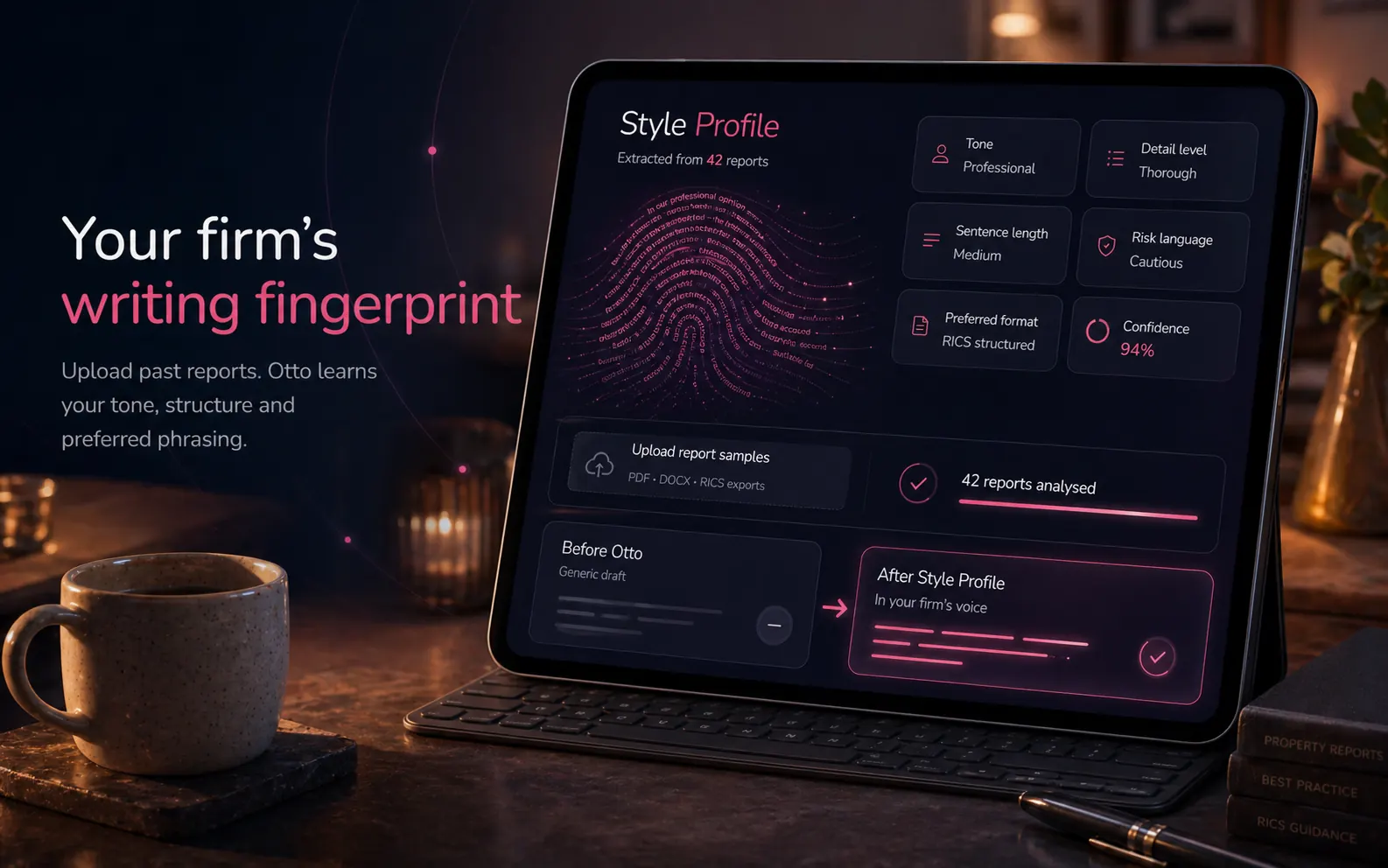
25 dimensions
The fingerprint. Five categories. Twenty-five dimensions.
A surveyor's voice isn't one thing — it's a stack of habits across structure, tone, vocabulary, patterns and formatting. Each dimension is extracted independently, scored against multiple sample reports, and merged into a single firm fingerprint that survives the noise of any one document.
- ●Each dimension is extracted with example sentences ("section exemplars") so the AI doesn't just have an abstract label — it has concrete examples of your firm's wording
- ●Multi-document merge averages out any one report's quirks (a verbose surveyor on one job, a terse one on another)
- ●Confidence score per dimension flags which areas the fingerprint is confident about and which need more samples
- ●Re-train at any time by uploading more recent reports — the older fingerprint is replaced cleanly, not mixed
How training works
5–10 samples. One-time setup. Permanent voice.
Upload your samples
Drop 5–10 of your firm's past survey reports (DOCX, PDF, or plain text). Anonymised reports work fine — the analysis reads your writing, not the client or property details.
Convert & read
Each file is converted to searchable text, then read by our AI engine, which identifies how your firm structures observations, phrases condition ratings and formats recommendations.
25-dimension fingerprint
The AI maps 25 style dimensions per document — from section structure to vocabulary choices — and records example phrases showing each dimension in your firm's own words.
Merge & cache
Observations from all uploaded reports merge into a single firm-wide style profile. Smartly cached during Otto runs so the second run inside a few minutes is faster and cheaper.
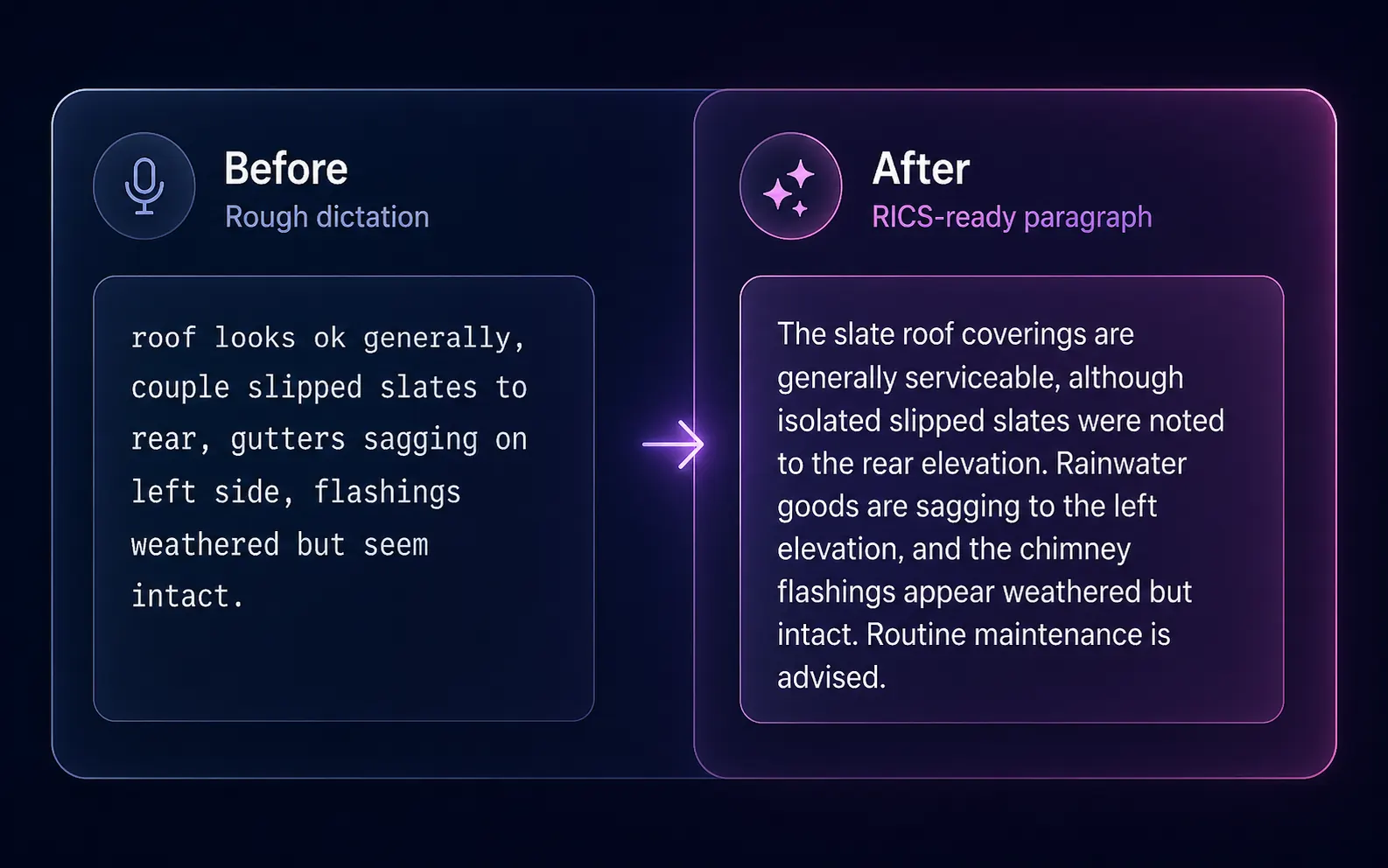
Before & after
Rough dictation in. RICS-ready paragraph out.
Otto only routes content you dictated. The Style Profile shapes how it lands — passive voice, longer sentences, your firm's anticipated-timing patterns and "exhibited"/"observed" lexicon.
Safeguards
Cost-capped. Fault-tolerant. Yours.
Per-document cost cap
Each style extraction is cost-protected; if a document is too long, text is auto-trimmed before sending. No runaway costs from a 200-page report.
Daily firm-level cap
A daily ceiling per firm is enforced before dispatch. You can't accidentally bulk-upload 200 reports and burn a fortune in extraction fees.
Automatic AI fallback
If the AI is unavailable, the extractor fast-fails rather than hammering the provider, and recovers automatically when the service is back.
Graceful degradation
If style extraction fails, Otto auto-mode continues — without the style block — rather than blocking the report. You can re-run the extraction later.
Smart caching
The merged profile is smartly cached during routing — the second auto-mode run inside a few minutes is faster and cheaper than the first.
Surveyor override
Style is a guide, not a constraint. You can rewrite any sentence in the editor. The profile influences first drafts; you control the final output.
Privacy by default
Reports are sent only to extract your style fingerprint. AI providers used do not train on customer content by default. The profile belongs to your firm and is used only by your firm.
Easy re-train
Upload more recent reports and rebuild the profile cleanly. The previous fingerprint is replaced — no awkward merging of old and new voices.
FAQ
Style Profile FAQs
How many sample reports do I need to upload?
5–10 reports give a robust profile. Each report extraction takes ~30 seconds; the merged profile builds in another minute. Multi-document merging reduces noise from any single document's quirks. More than 10 doesn't materially improve the fingerprint — diminishing returns set in fast.
How long does the profile last?
Permanently — until you replace it. The profile is smartly cached during auto-mode runs, and the underlying observation records stay in your firm's account and can be rebuilt whenever you upload more samples.
Will my reports be used to train the underlying AI?
No. Reports are sent only to extract your style fingerprint, and we use AI providers that do not train on customer content by default. The extracted profile is yours, used only by your firm.
Can different surveyors in my firm have different styles?
The current implementation is one profile per firm. We've found firm-wide consistency is what most clients want — but per-surveyor profiles are on the roadmap if there's demand.
Does the profile work outside Otto?
Yes — it's injected into AI Dictation routing too, and into the inline "Rewrite with AI" feature. Anywhere the system is generating text on your behalf, the profile shapes the output.
Can I see what the AI extracted?
Yes. The Style Profile dashboard shows every dimension with its extracted value, the confidence score, and example sentences from your sample documents. You can disagree with a dimension and the system will weight it down on the next merge.
Does it work with anonymised reports?
Yes — encouraged. The extractor only learns writing patterns; redacted property addresses and client names don't affect the fingerprint quality.
How is the profile different from the standard phrases tool?
Phrases are discrete reusable text snippets you insert manually. The Style Profile is a broader voice fingerprint — vocabulary preferences, sentence structure, formality, depth. Both feed into Otto auto-mode independently; together they give the AI the most complete picture of your writing style.
More tools
Explore the rest of the surveyor toolkit
Otto
AI auto-mode RICS report writer
Dictate on-site, upload photos, get a finished, fully-routed Level 2 or Level 3 report in minutes.
Level 2 Report Writer
RICS Home Survey Level 2
Field-by-field RICS Level 2 reports with inline AI suggestions, image gallery, comparables and one-click branded PDF.
Level 3 Report Writer
RICS Building Survey Level 3
Comprehensive Level 3 Building Survey reports with deep technical sections, custom rating scales and AI legal-adviser notes.
Surveyor Comparable Tool
Sold + rental comps in one click
Auto-fetch sold and rental comparables within a 1-mile radius, weighted valuation range, branded PDF appendix for any survey.
Snagging Report Builder
New-build defect tracker
Build professional new-build snagging lists with location-based defect tracking, photos, urgency, status and PDF export.
AI Dictation
Voice-to-fields routing
Speak observations on-site; AI routes every sentence to the correct RICS field with confidence scores and replayable audio.
Image AI
Auto-categorise survey photos
Upload up to 200 photos; vision AI tags each to the right RICS element, rates condition, extracts defects and picks the best 35 for the report.
Property Viewer
Pre-survey property intelligence
Look up any UK property and instantly see EPC, energy renovation costs, broadband coverage, environmental risks (flood, radon, mining, landfill), invasive plants, sales history and listing status — all in one dashboard.
Property Data Drawer
EPC + risks + comps in one panel
Open the property data drawer in any report to see EPC, environmental risks, listing history and comparables — copy-paste ready.
Standard Phrases
Reusable language library
Personal, firm-wide and industry-preset phrase libraries — insert with one click and use to train AI routing for voice consistency.
RICS Standards Check
Home Survey Standard compliance pass
One-click AI compliance pass against the RICS Home Survey Standard — flags missing content, weak ratings and structural gaps before you sign the report.
Free directory listing. Pay-as-you-go toolkit.
Every RICS-regulated surveying firm gets a verified profile, direct bookings from home.co.uk consumers and the surveyor toolkit included with the account. No subscription. No pay-per-lead. No commission on the job. Pay only when you use the premium AI tools.
2 minute setup · Verified against the RICS register · Trusted UK property platform since 1995