
Stop typing the same paragraph thirty times.
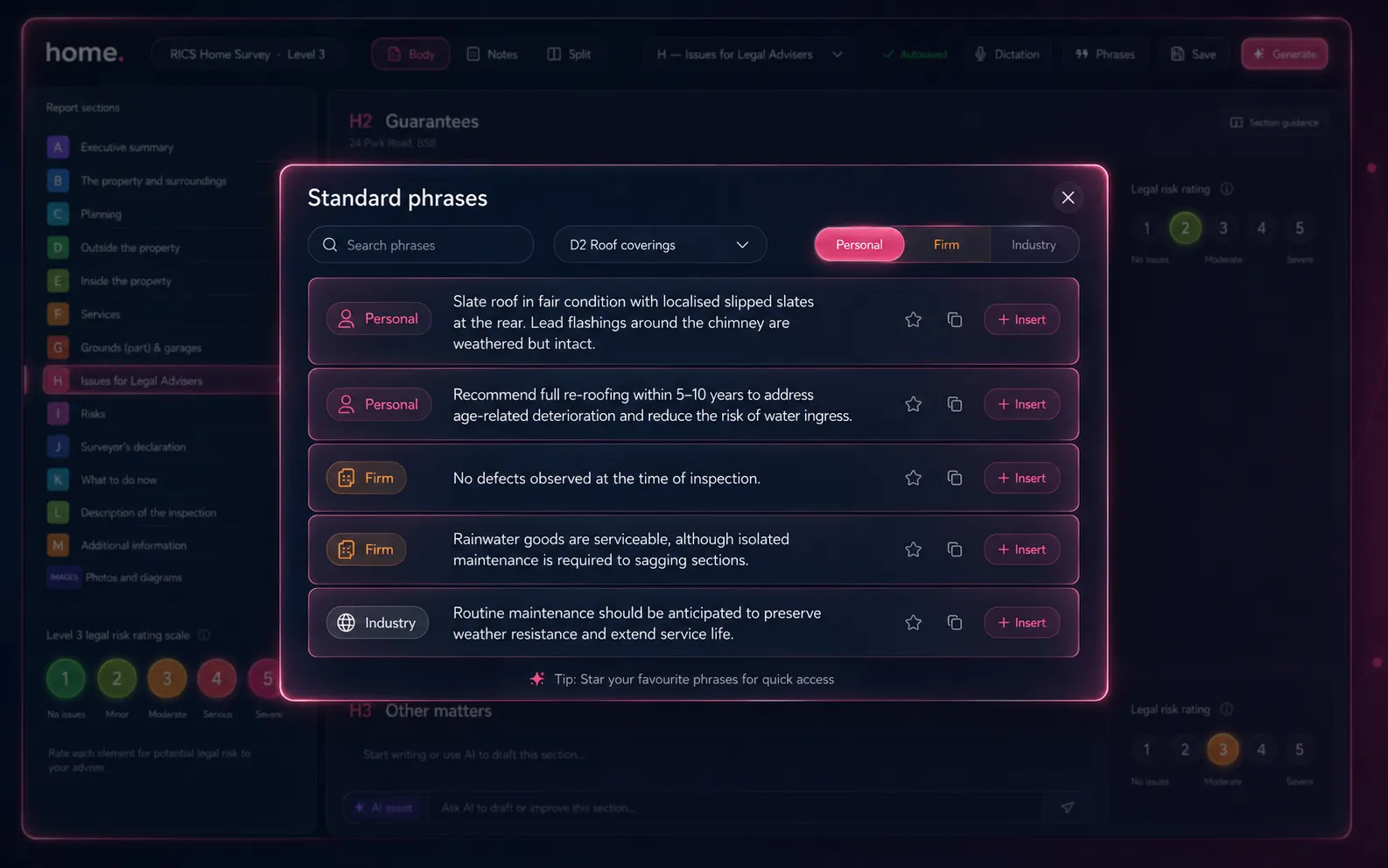
A three-tier library of reusable language: your personal phrases, your firm's shared phrases, and a curated industry preset library. Filter by RICS section, search, click to insert. The AI also reads the loaded phrases as routing context — so auto-generated content stays consistent with the voice your firm has built up over years.
Three tiers
Personal · Firm · Industry
Personal phrases
Your own language snippets — the way you describe a sagging gutter, your standard recommendation for an EICR cycle. Yours alone, carry across every report you write.
Firm phrases
Firm-wide phrases shared across the practice — used by every surveyor in your firm to keep voice and tone consistent. Edit centrally; surfaces in every editor.
Industry presets
Curated home.co.uk preset library — common, RICS-aligned phrasing for the standard observations every surveyor writes about ("no defects observed", "remedial works required").
AI routing context
Phrases also teach the AI.
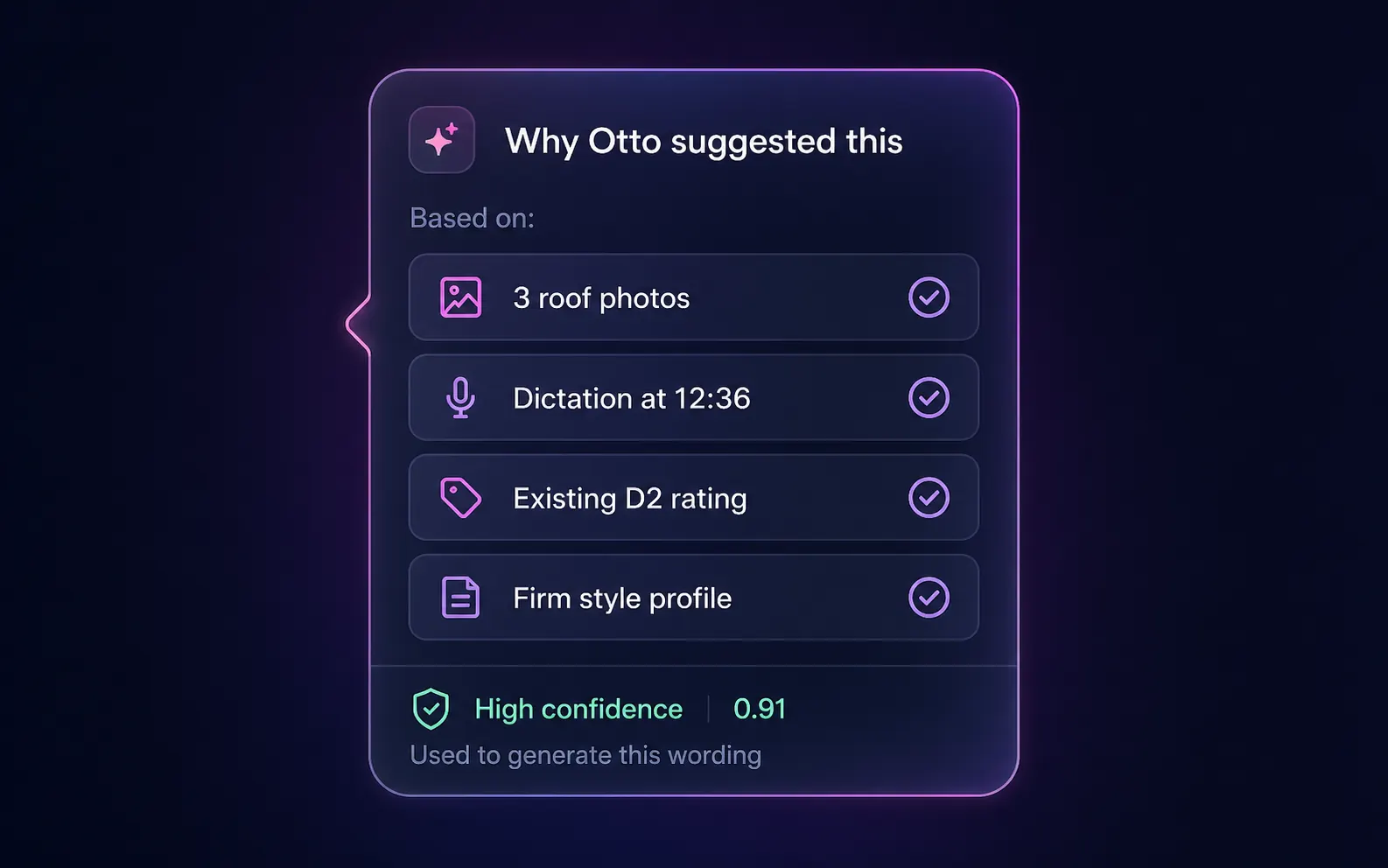
When you run Otto auto-mode or AI Dictation, the system loads up to 100 of your most relevant phrases — personal first, then firm, then industry presets — and passes them to the AI as routing context. Otto then shows the receipts: which photos, which dictation, which firm rules went into every wording it proposes.
Promote · personal → firm
A phrase travels when it should.
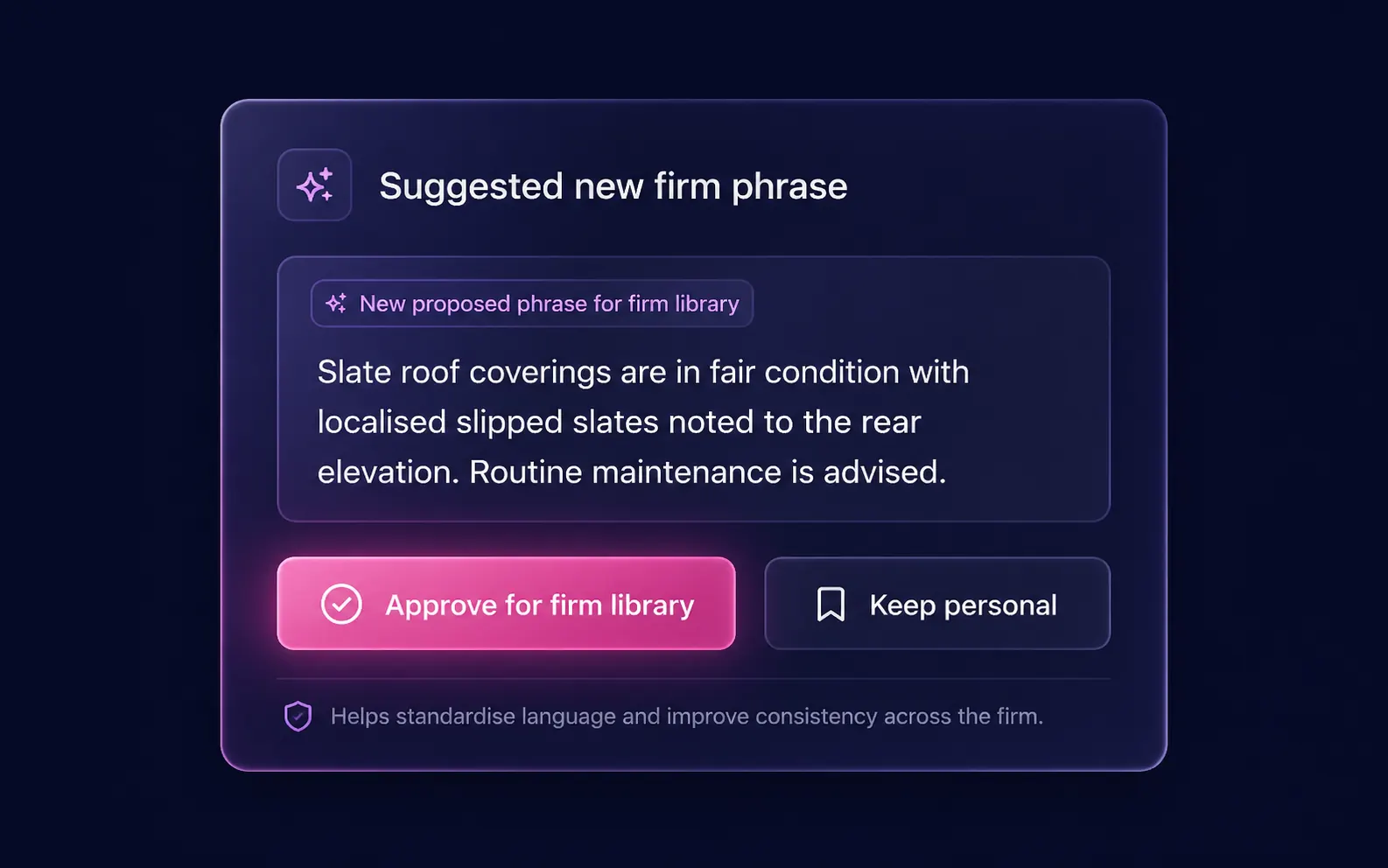
When a personal phrase is used repeatedly across surveyors, the system flags it for promotion to the firm library. One tap from any senior surveyor approves it for the whole firm — or keeps it personal. House style accumulates from the bottom up, not by committee.
- ●Suggestions surface based on cross-surveyor reuse
- ●Promotion is opt-in — no automatic firm-wide changes
- ●Helps standardise language without forcing it
AI bulk import
Turn your old reports into a phrase library in seconds.
Paste any text — old survey reports, a Word document, a plain-text phrase list — into the bulk import field. The AI analyses the content, extracts every distinct observation, assigns each one a RICS section code and saves them to your library. If your firm uses internal reference codes such as SP1, SP2 or L-001, these are detected and preserved automatically so your existing numbering carries across.
- Maps informal element descriptions to the correct RICS sub-section code (e.g. "flaunching around the pot" → D1 Chimney stacks)
- Preserves variant wordings as separate phrases — surveyors intentionally keep multiple versions of the same observation
- Recovers partial extractions gracefully — if the document is very long, completed phrases are saved even if the run is truncated
- Works with Level 2 and Level 3 phrase scoping — invalid section codes for the chosen level are silently nullified, not discarded
Flaunching around the chimney pot is cracked and loose. Repointing is recommended before the next winter season.
Several slate tiles observed to have slipped from the main roof slope. Repair by a specialist roofing contractor is advised.
The consumer unit contains older-style rewireable fuse carriers. An Electrical Installation Condition Report (EICR) is recommended.
Artex-textured coating to the lounge ceiling may contain chrysotile asbestos. Do not disturb; seek specialist advice before any remedial work.
Phrase code shortcuts
Dictate a code. Get the full phrase.
If your phrases carry internal reference codes — SP1, SP29, L-04, or any other scheme — you can dictate those codes during Otto auto-mode or AI Dictation. The system looks up the matching phrase and substitutes the full content automatically, before any text reaches the report.
Supported reference formats: [SP29], Insert SP29, SP29 bare — all resolved automatically.
Section coverage
Every RICS section. Every subsection.
Phrases can be tagged to any of the 35+ RICS Home Survey section codes across both Level 2 and Level 3 reports. Filter by section in the editor to see only the phrases relevant to the element you are writing about.
D1 Chimneys · D2 Roof coverings · D3 Rainwater pipes · D4 Main walls · D5 Windows · D6 Doors · D7 Conservatories · D8 Other joinery · D9 Other
E1 Roof structure · E2 Ceilings · E3 Walls · E4 Floors · E5 Fireplaces · E6 Built-in fittings · E7 Woodwork · E8 Bathroom fittings · E9 Other
F1 Electricity · F2 Gas/Oil · F3 Water · F4 Heating · F5 Water heating · F6 Drainage · F7 Common services
G1–G3 Grounds · H1 Regulation · H2 Guarantees · H3 Other · I1 Building risks · I2 Grounds risks · I3 People risks · I4 Other risks
J (Surveyor's declaration) · K (What to do now) · L (Service description)
J1–J5 (Energy matters) · K_SHORT / K_LONG (Remedial costs) · L (Declaration) · M (What to do now) · N (Service description)
FAQ
Common questions
How do I import my existing phrase library?
Can I share phrases with colleagues at my firm?
How does the AI use my phrases when generating report content?
What RICS sections can phrases be tagged to?
Can I dictate phrase codes to insert phrases automatically?
Does the library work with both Level 2 and Level 3 reports?
Is there a limit to how many phrases I can store?
How is the standard phrases library different from the style profile tool?
More tools
Explore the rest of the surveyor toolkit
Otto
AI auto-mode RICS report writer
Dictate on-site, upload photos, get a finished, fully-routed Level 2 or Level 3 report in minutes.
Level 2 Report Writer
RICS Home Survey Level 2
Field-by-field RICS Level 2 reports with inline AI suggestions, image gallery, comparables and one-click branded PDF.
Level 3 Report Writer
RICS Building Survey Level 3
Comprehensive Level 3 Building Survey reports with deep technical sections, custom rating scales and AI legal-adviser notes.
Surveyor Comparable Tool
Sold + rental comps in one click
Auto-fetch sold and rental comparables within a 1-mile radius, weighted valuation range, branded PDF appendix for any survey.
Snagging Report Builder
New-build defect tracker
Build professional new-build snagging lists with location-based defect tracking, photos, urgency, status and PDF export.
AI Dictation
Voice-to-fields routing
Speak observations on-site; AI routes every sentence to the correct RICS field with confidence scores and replayable audio.
Image AI
Auto-categorise survey photos
Upload up to 200 photos; vision AI tags each to the right RICS element, rates condition, extracts defects and picks the best 35 for the report.
Style Profile
Your firm's writing fingerprint
Teach the AI to write like your firm — upload past reports, the AI extracts a 25-dimension writing fingerprint and applies it to every future auto-mode report.
Property Viewer
Pre-survey property intelligence
Look up any UK property and instantly see EPC, energy renovation costs, broadband coverage, environmental risks (flood, radon, mining, landfill), invasive plants, sales history and listing status — all in one dashboard.
Property Data Drawer
EPC + risks + comps in one panel
Open the property data drawer in any report to see EPC, environmental risks, listing history and comparables — copy-paste ready.
RICS Standards Check
Home Survey Standard compliance pass
One-click AI compliance pass against the RICS Home Survey Standard — flags missing content, weak ratings and structural gaps before you sign the report.
Free directory listing. Pay-as-you-go toolkit.
Every RICS-regulated surveying firm gets a verified profile, direct bookings from home.co.uk consumers and the surveyor toolkit included with the account. No subscription. No pay-per-lead. No commission on the job. Pay only when you use the premium AI tools.
2 minute setup · Verified against the RICS register · Trusted UK property platform since 1995