
The Level 2 report writer that thinks in RICS elements.
Build a RICS Home Survey Level 2 (HomeBuyer Report) field by field, with the structure baked in: validated element codes, condition ratings, image galleries, comparable sales and AI content suggestions on every field. Editable web report in the browser, branded PDF in one click.
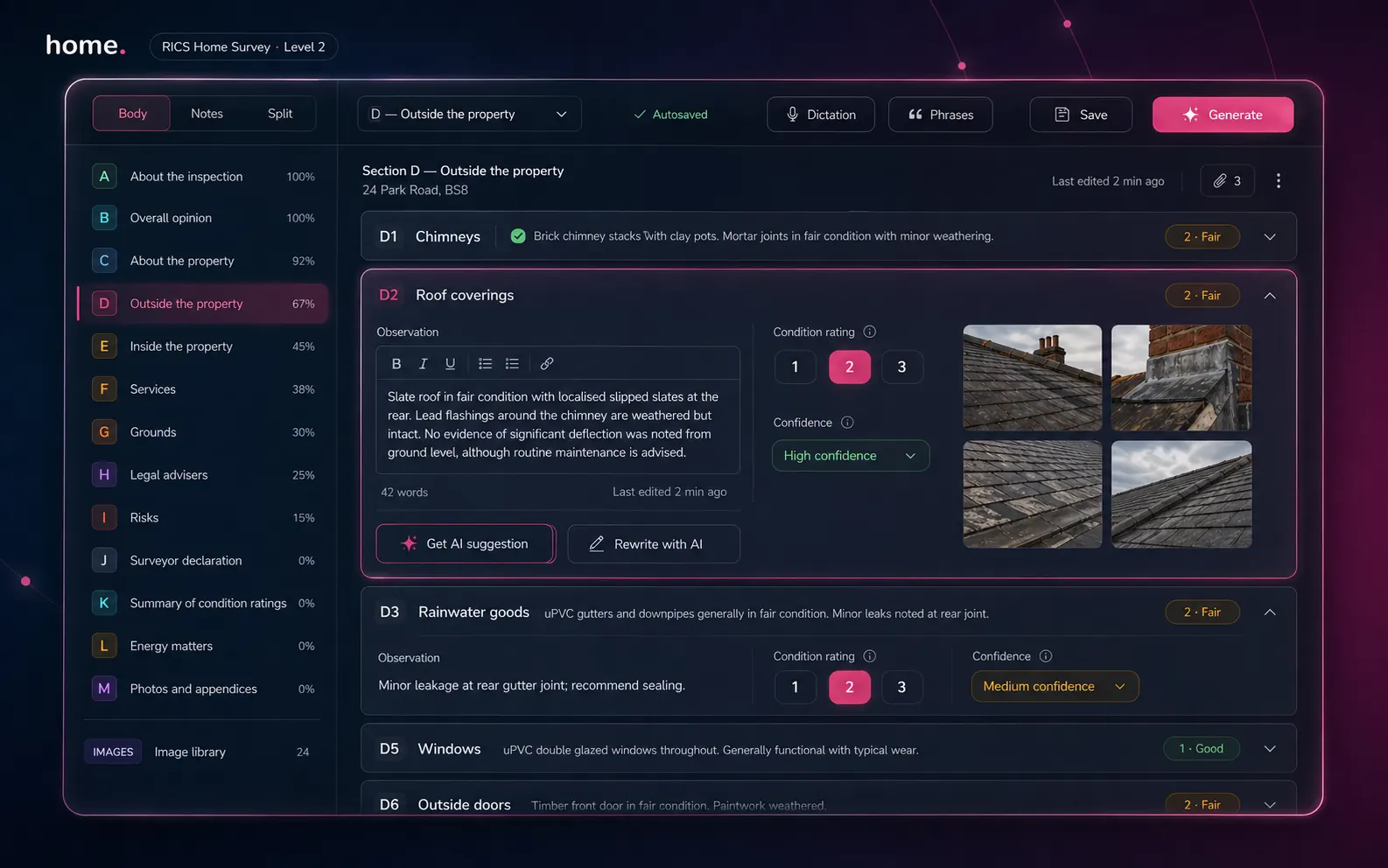
From dashboard to delivery
Open the report. Write the report. Ship the report.
Three views from the same Level 2 report — the dashboard you open it from, the editor you write in, and the share-ready output.
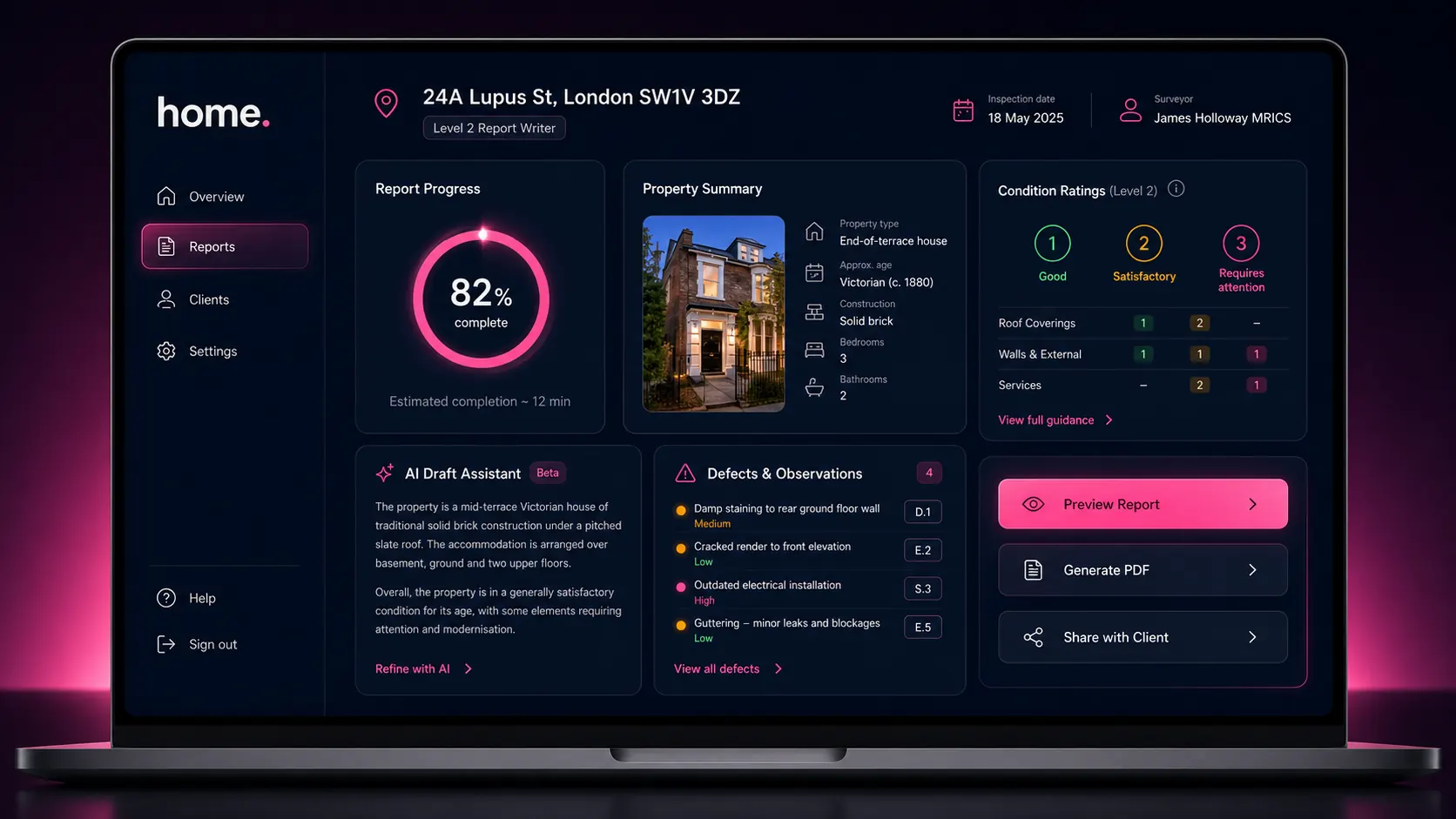
1 · Open
The report dashboard
Property summary, completeness gauge, condition rating overview and a one-click "Generate PDF" button. See where every report is in 30 seconds.
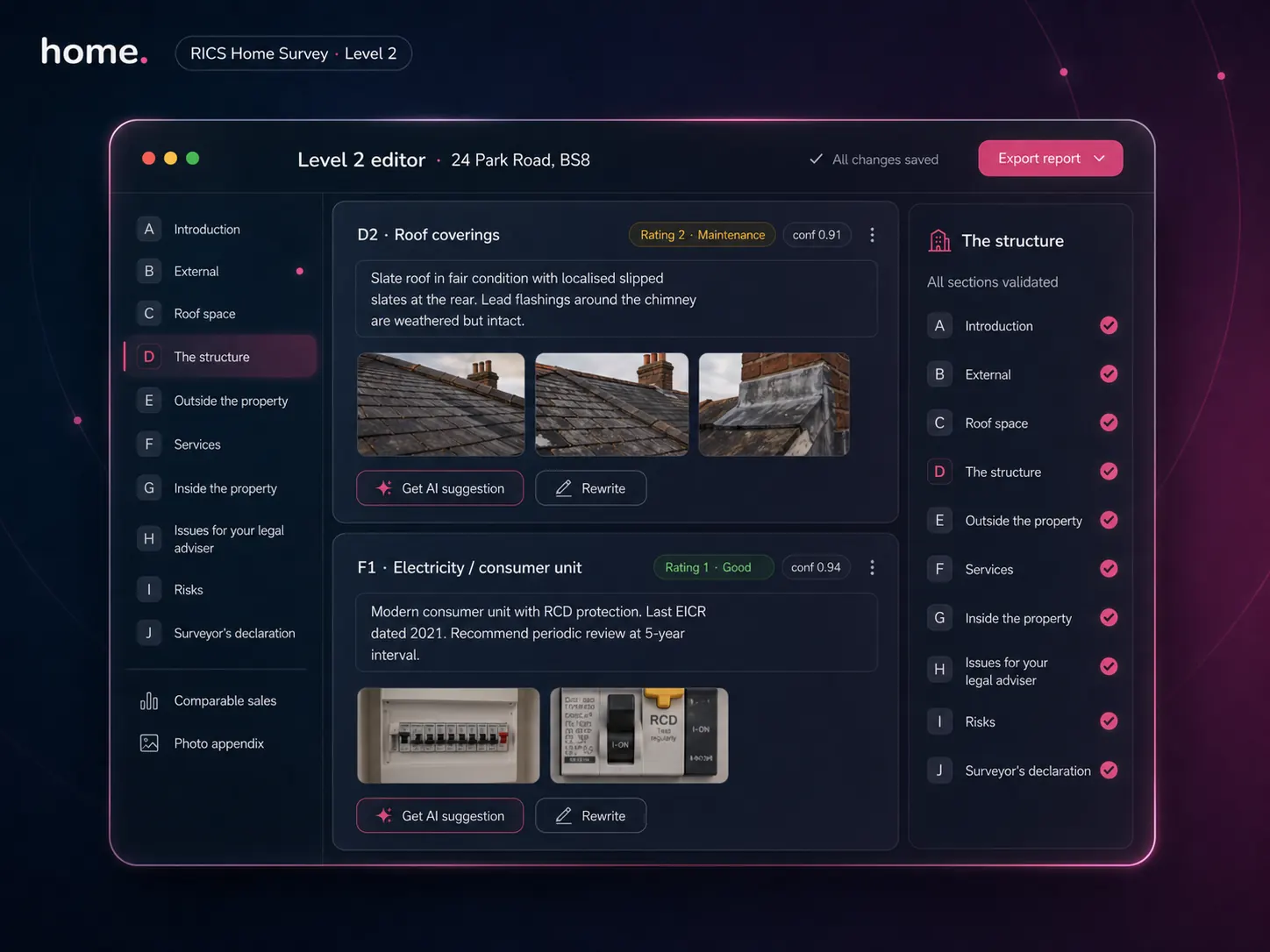
2 · Write
The element editor
Element by element — observation, rating, photos, AI suggestion. The whole report tree is on the left. Reorder, hide, expand.
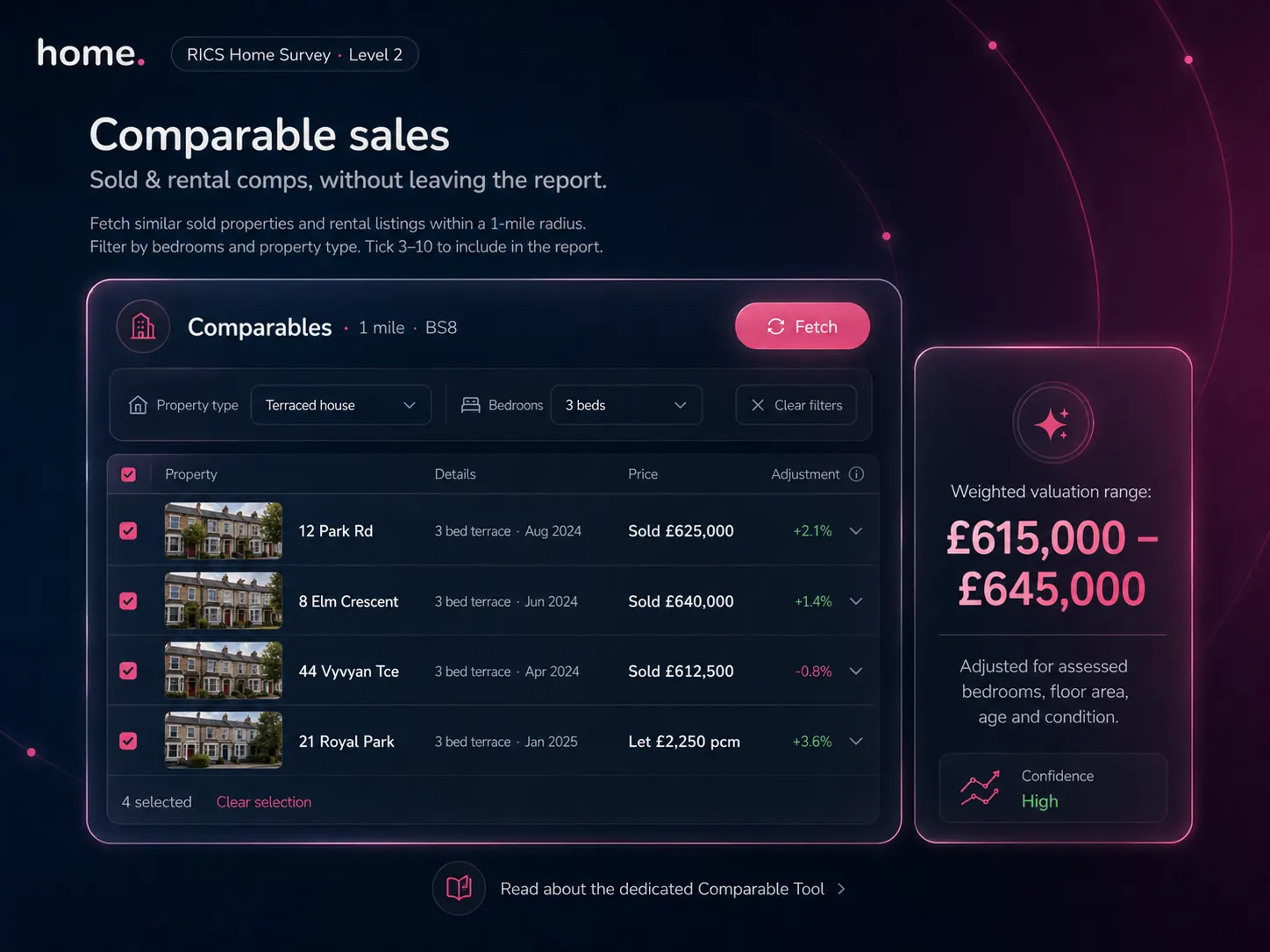
3 · Ship
Comparables baked in
Comparable sales appear inside the Level 2 — sold and rental comps within 1 mile, weighted valuation range, surveyor-curated 3–10 picks straight into the appendix.
The structure
Every section. Every element. Validated.
Sections A through J of the RICS Home Survey Level 2 standard, baked into the editor as first-class data. Element codes, rating dropdowns, evidence images and adviser notes — none of it free-form, none of it copy-paste from a Word template.
About the inspection
Inspector details, RICS number, firm details, inspection date, weather, access notes, accommodation summary. Auto-pre-filled from your firm profile.
Overall opinion & summary
Overall opinion paragraph, priority items, condition summary one-liners. Optionally synthesised by Otto from D-G ratings.
About the property
Construction, age, walls, roof, windows, heating, floors, location, facilities, environmental risks. Auto-populated from EPC + UPRN + image summaries.
External elements (D1–D9)
Chimneys, roof coverings, rainwater goods, main walls, windows, outside doors, conservatories, other. Each with comments + rating + photos.
Internal elements (E1–E9)
Roof structure, ceilings, walls, floors, fireplaces, built-in fittings, woodwork, bathrooms, kitchens. Element-by-element narrative.
Services (F1–F7)
Electricity, gas, water, heating, hot water, drainage, common services. Includes EICR / boiler service notes where evident.
Grounds (G1–G3)
Garage, outbuildings, the grounds (boundaries, retaining walls, paving). Ratings respect site context.
Issues for legal advisers
Regulations (H1), guarantees (H2), other matters (H3). Synthesised in Level 3; manual in Level 2.
Risks
Energy / sustainability and risk to building, grounds and people. Driven from EPC and image findings.
Surveyor declaration
Signatory line, RICS number, firm address, regulatory disclosure.
Comparable sales appendix
Optional: 3–10 sold comparables and rental comps within 1 mile, weighted valuation range.
Photo appendix
Top ~35 images selected by the photo AI scoring algorithm (configurable 25–50).
AI on demand, never in the way
You write. The AI assists.
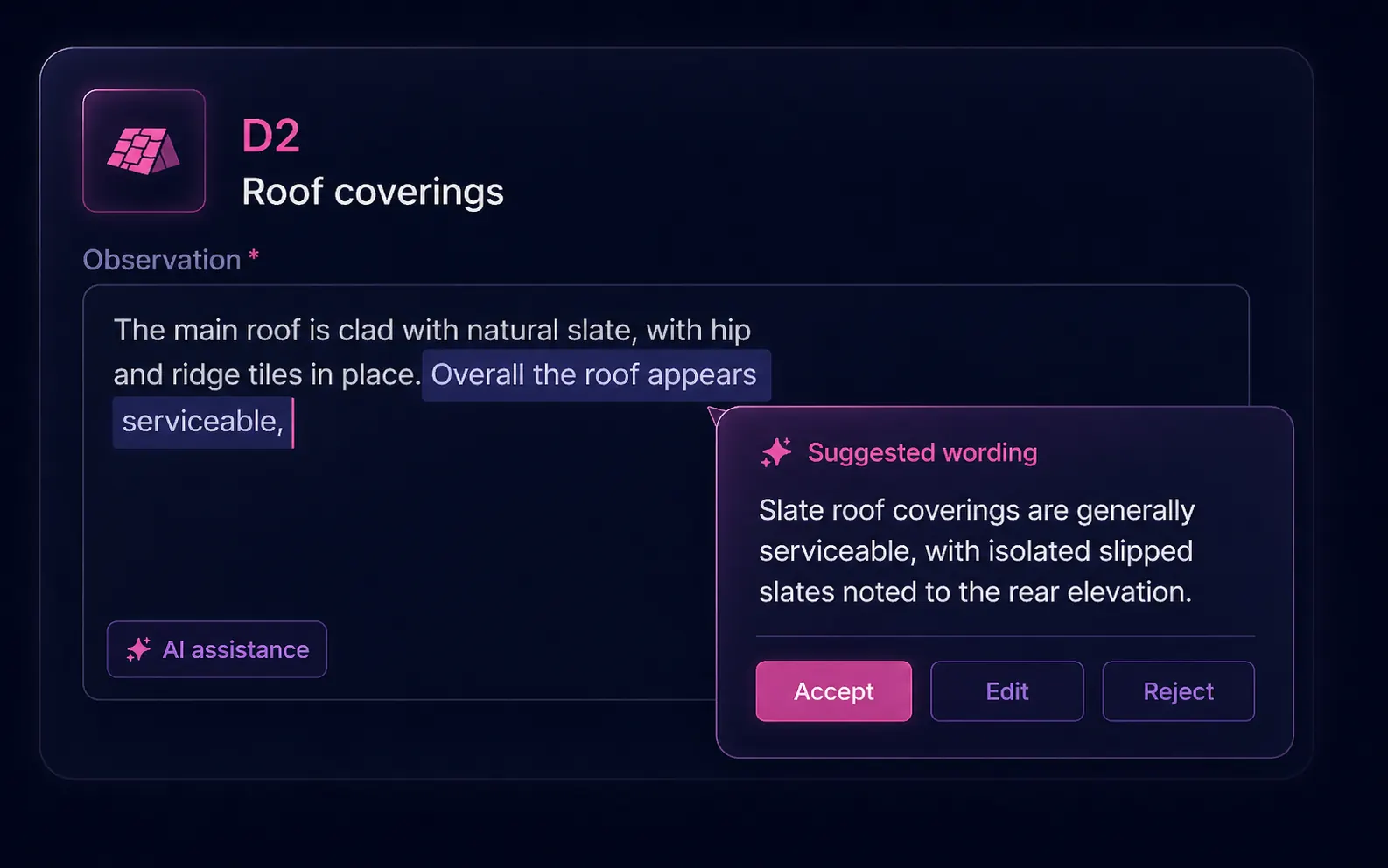
Suggestions appear where you type.
Click into any field, highlight a fragment of your draft, and Otto proposes a polished alternative right next to your cursor. The model receives the field path (e.g. D.D2.comments), your existing text, the current rating, the property data and any photos attached to the element — and writes a context-aware draft.
Three buttons: Accept, Edit, Reject. The AI never silently mutates your prose.
Rewrite with AI
Highlight any sentence or paragraph and choose "Rewrite". The model rephrases for clarity, formality or conciseness while preserving technical accuracy and your firm's voice (via the Style Profile).
Particularly useful for non-native English surveyors and for tightening overlong narratives.
RICS standards check
Submit any section — or the whole report — for a standards review. The AI compares the content against the RICS Home Survey Standard and returns feedback on completeness, clarity and missing elements.
Not a replacement for QA — but catches the obvious gaps before they reach the client.
Comparable sales
Sold & rental comps,
without leaving the report.
Open the Comparables tab, hit Fetch, and the system queries our property database for similar sold properties and rental listings within a 1-mile radius. Filter by bedrooms and property type. Tick 3–10 to include in the report. The system calculates a weighted valuation range adjusted for assessed bedrooms, floor area, age and condition.
Read about the dedicated Comparable ToolIn the editor
The interface is the final report.
No "preview" tab. The editable web report you edit is the same report that ships to the client and renders the PDF.
Image gallery per element
Drag images between D1–G3 sections. Mark front elevation. Add captions. Bulk reassign with section dropdowns.
Full undo/redo
Transactional history across the editor. Restore the last AI rewrite, the last image move, the last ratings change.
Pre-filled Section A
Surveyor name, RICS number, firm name and address pulled from your firm profile.
Save as draft, return later
Reports persist server-side; pick up on a different device with the same login.
Ship the report
Live contents. One-click PDF.
Two things that take half an hour in Word — keeping the table of contents in sync, and exporting a clean branded PDF — happen automatically as you write.
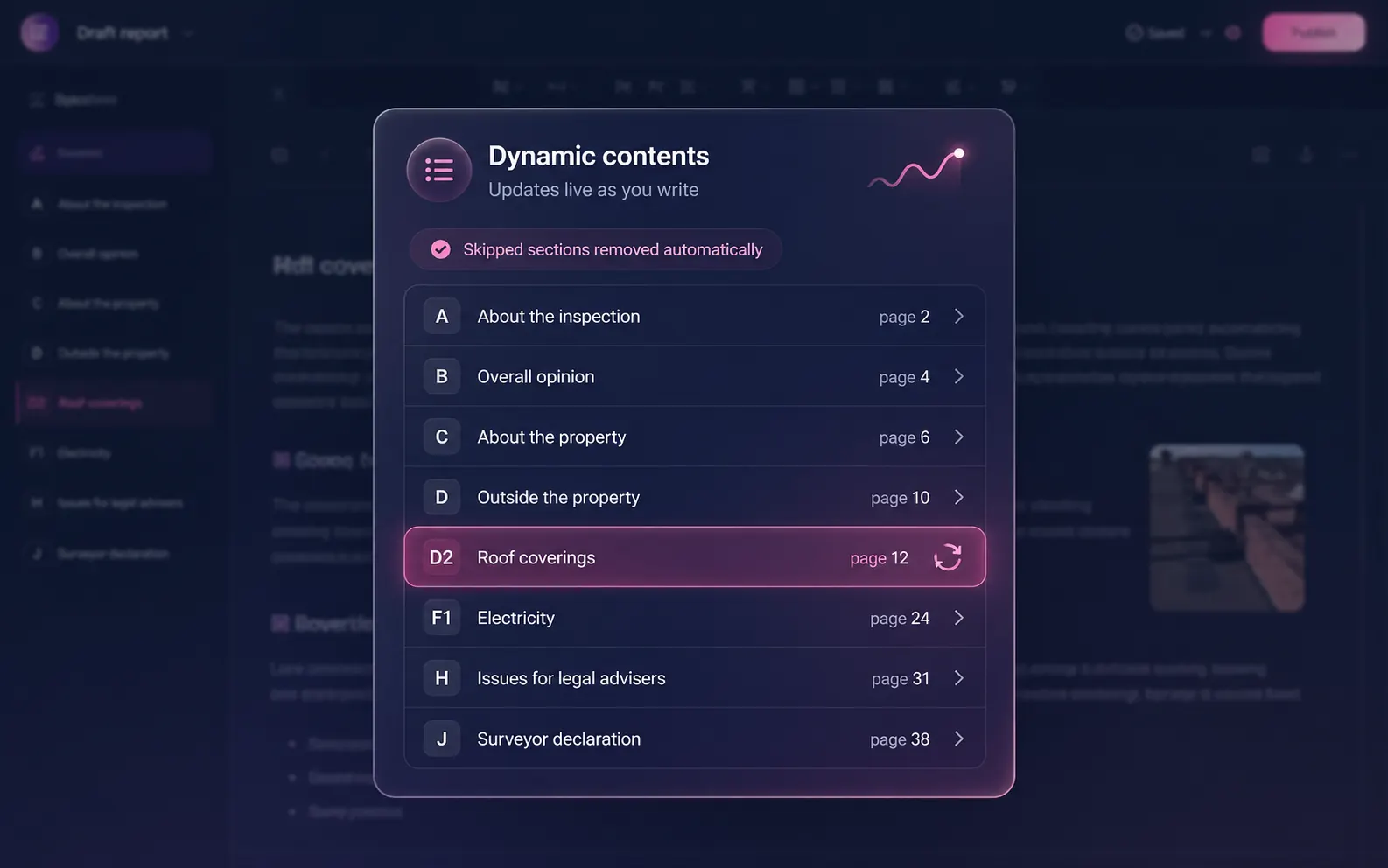
Table of contents that maintains itself
Page numbers regenerate as you write. Skipped sections are dropped automatically — no orphan "Section H" entries pointing to nothing. Open the contents panel to jump straight to any section while editing.
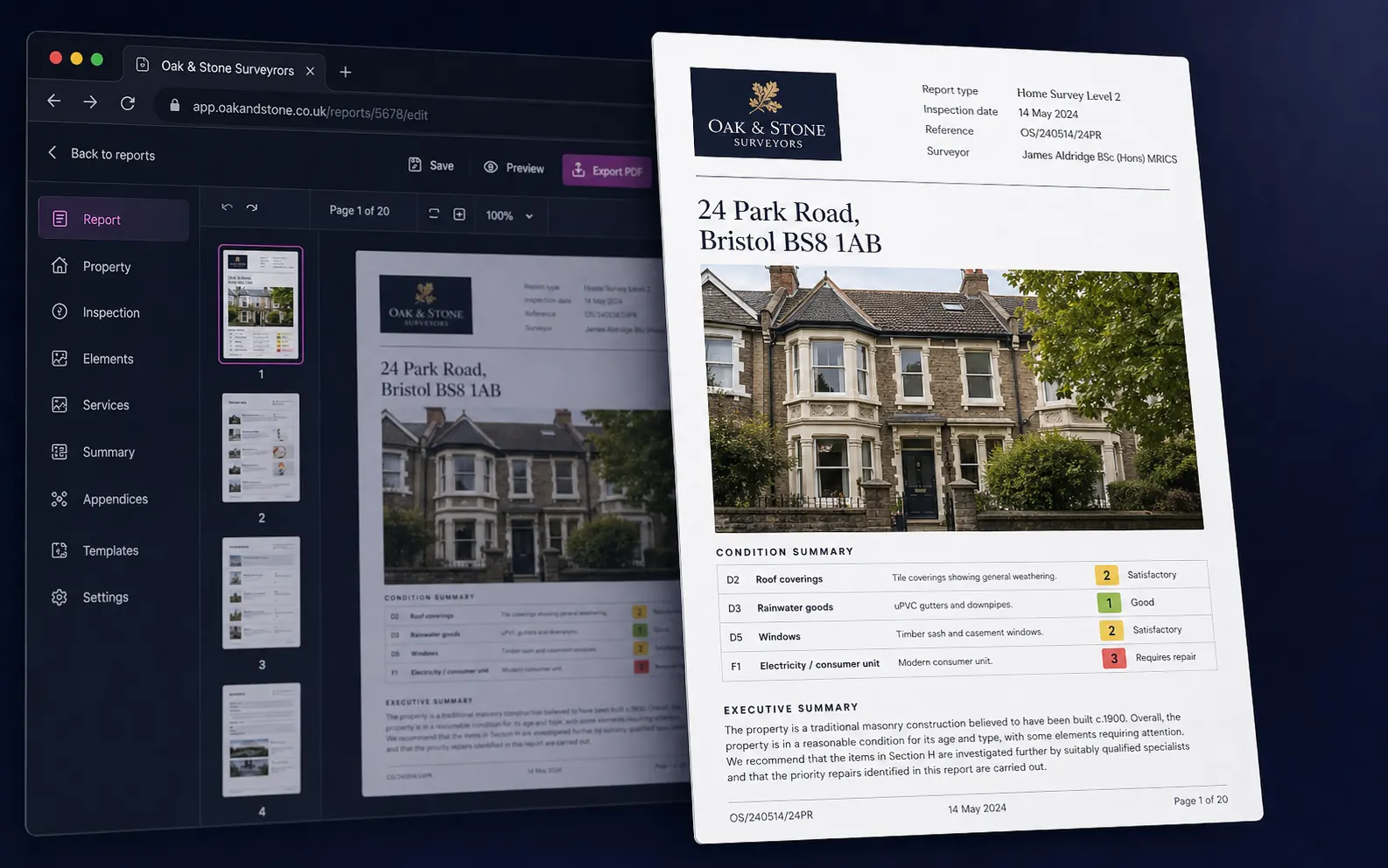
Branded PDF in one click
Our PDF engine renders the editable web report to a print-ready A4 PDF with your firm's logo, cover page, condition summary, executive summary, photo appendix and page numbers. Share via secure token-based link or download.
FAQ
Common questions
What is a RICS Level 2 Home Survey?
The RICS Home Survey Level 2 (formerly the HomeBuyer Report) is a mid-level home survey aimed at conventional, well-maintained properties. It uses traffic-light condition ratings (1=Good, 2=Maintenance, 3=Serious Defects) across the building's external, internal, services and grounds elements, and includes legal/adviser notes. It sits between a Level 1 (condition report) and a Level 3 (full Building Survey).
How is this different from Otto?
The Level 2 Report Writer is the manual editor — you author each section yourself with AI content suggestions on demand. Otto is the auto-mode flow built on top of the same data model: it routes a dictation transcript and photos directly into the same Level 2 report. You can switch between the two on any single report.
Can I export to Word?
The default export is a branded PDF rendered from the editable web report. Word export is available as an admin-configurable output for firms that need editable .docx for client revisions.
Does the AI see my client's data?
The AI sees only the inspection data you enter and the photos you upload. It is not used to train provider models. All requests are made server-side from your Home.co.uk account.
Can I customise the rating scale?
Yes. If your firm uses a 5-point scale instead of the standard 1/2/3, define it in your firm settings. The AI prompts dynamically rebuild to use your terminology and the ratings dropdown updates accordingly.
How are comparables sourced?
Comparables come from our property database — the same source that powers home.co.uk's public sold-prices and rental-prices pages. You'll get sold properties and rental listings within a 1-mile radius filtered by bedrooms and property type.
More tools
Explore the rest of the surveyor toolkit
Otto
AI auto-mode RICS report writer
Dictate on-site, upload photos, get a finished, fully-routed Level 2 or Level 3 report in minutes.
Level 3 Report Writer
RICS Building Survey Level 3
Comprehensive Level 3 Building Survey reports with deep technical sections, custom rating scales and AI legal-adviser notes.
Surveyor Comparable Tool
Sold + rental comps in one click
Auto-fetch sold and rental comparables within a 1-mile radius, weighted valuation range, branded PDF appendix for any survey.
Snagging Report Builder
New-build defect tracker
Build professional new-build snagging lists with location-based defect tracking, photos, urgency, status and PDF export.
AI Dictation
Voice-to-fields routing
Speak observations on-site; AI routes every sentence to the correct RICS field with confidence scores and replayable audio.
Image AI
Auto-categorise survey photos
Upload up to 200 photos; vision AI tags each to the right RICS element, rates condition, extracts defects and picks the best 35 for the report.
Style Profile
Your firm's writing fingerprint
Teach the AI to write like your firm — upload past reports, the AI extracts a 25-dimension writing fingerprint and applies it to every future auto-mode report.
Property Viewer
Pre-survey property intelligence
Look up any UK property and instantly see EPC, energy renovation costs, broadband coverage, environmental risks (flood, radon, mining, landfill), invasive plants, sales history and listing status — all in one dashboard.
Property Data Drawer
EPC + risks + comps in one panel
Open the property data drawer in any report to see EPC, environmental risks, listing history and comparables — copy-paste ready.
Standard Phrases
Reusable language library
Personal, firm-wide and industry-preset phrase libraries — insert with one click and use to train AI routing for voice consistency.
RICS Standards Check
Home Survey Standard compliance pass
One-click AI compliance pass against the RICS Home Survey Standard — flags missing content, weak ratings and structural gaps before you sign the report.
Free directory listing. Pay-as-you-go toolkit.
Every RICS-regulated surveying firm gets a verified profile, direct bookings from home.co.uk consumers and the surveyor toolkit included with the account. No subscription. No pay-per-lead. No commission on the job. Pay only when you use the premium AI tools.
2 minute setup · Verified against the RICS register · Trusted UK property platform since 1995