
EPC. Risks. Comps. One drawer.
Every report editor has a Property Data drawer that pulls everything you'd otherwise have eight tabs open for — EPC certificate, flood / subsidence / radon risks, listing history, sold and rental comparables, and the underlying property record (bedrooms, build year, walls, roof, heating, floors). All keyed to the subject UPRN. All copy-paste ready into your sections.
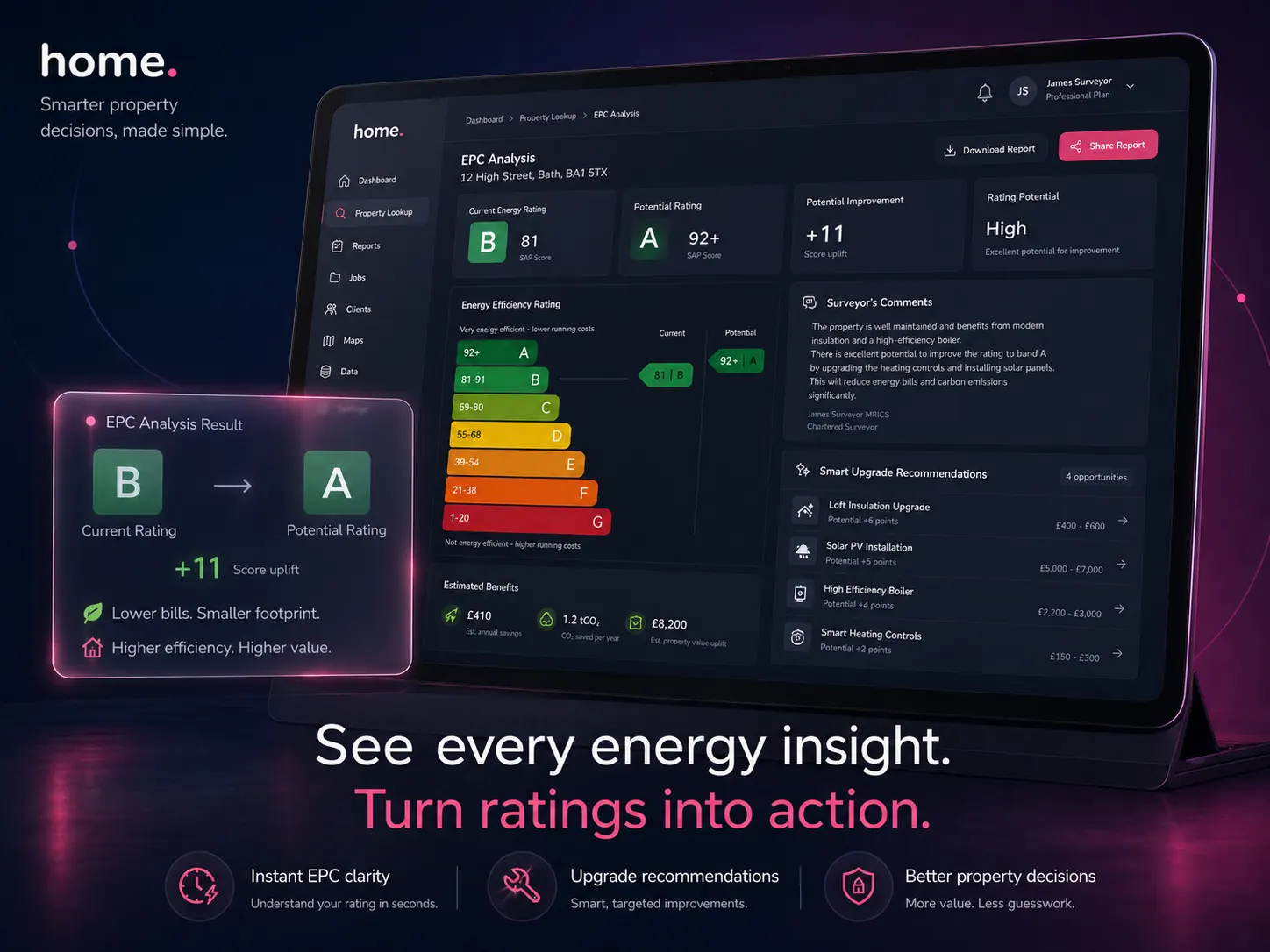
In the drawer
Five tabs. Everything you need.
All five sources are keyed to the subject UPRN and loaded automatically when you open a report — no separate logins, no switching tools, no copy-pasting from government portals.
Property record
35+ fields · 1-hour cacheUPRN-keyed snapshot from our property database: property type, built form, construction age band, bedrooms, bathrooms, floors, habitable rooms, heated rooms, EPC floor area, predicted floor area, construction material, roof material, roof shape, windows type, fireplaces, extensions, basement, solar panels, garden, parking, land area, building height, council tax band, predicted price, and average area price.
EPC certificate
25+ fields · 30-day cacheLive data from the UK Government OpenData EPC register: current and potential rating and efficiency score, floor area, wall, roof, floor and window descriptions with energy efficiency ratings, main heating and controls, hot water and lighting type, main fuel, mains gas flag, annual heating, hot water and lighting costs in £, and CO2 emissions in tonnes per year.
Environmental risks
Flood · subsidence · radon · landFlood risk (river and sea), surface water flooding, subsidence risk, radon risk, contaminated land and ground stability — each expressed as low, medium or high severity. This data feeds directly into Otto auto-mode's Section C local environment paragraph, including the correct Environment Agency Flood Zone designation and radon advisory statement.
Listing
Photos · description · key metricsMost recent estate agent listing matched by UPRN exact match first (agent CRM feeds — with up to 40 gallery photos), falling back to postcode and street-name match from third-party listing archives. Shows address, status, price, tenure, floor area, EPC rating, council tax band, parking and the full listing description — useful "as-marketed" context versus "as-found" condition.
Comparables
Sold · rental · 1-mile radiusRecent sold and rental comparables within a 1-mile radius — a quick sanity-check without leaving the report. For full weighted valuation with adjustable parameters and a formatted comparison table, use the dedicated Comparable Sales tool.
Map + Street View
Embedded OpenStreetMap widget centred on the property with a ~200 m bounding box, plus one-click deep links to Street View and Google Maps — all derived from the UPRN's coordinates.
Auto-population
The drawer feeds Section C automatically
When you run Otto auto-mode, the Section C auto-populator draws on three sources surfaced by this drawer: UPRN and EPC core data, Image AI categorised photo summaries, and the estate agent listing description for the accommodation room grid. Each of the nine Section C fields carries a confidence score (0–1) and a citation back to whichever source produced it.
UPRN / EPC data
Property type, age band, walls, roof, heating, floor area, EPC rating and CO2 cost — sourced from the property record and EPC certificate via UPRN lookup.
Image AI summaries
Categorised photo summaries from RICS sections D–G feed wall construction, roof condition, heating type and outbuilding details into the construction paragraph.
Listing description
The estate agent's room-by-room walkthrough is the primary source for the accommodation grid: room counts per floor, conservatory, utility room and WC.
Nine Section C fields tracked by the auto-populator
How it works
From UPRN to report paragraph in seconds
Open the report
The moment you open a report in the editor, the drawer issues parallel UPRN lookups to our property database, the EPC register, the estate agent listing archive and the environmental risks data. Each result is cached per UPRN, so any property you revisit loads in under a second.
Browse five tabs
Navigate between Property record, EPC, Risks, Listing and Comps with a single click. Each tab shows its data source label and cache freshness so you always know whether you are looking at a live response or a cached snapshot.
Copy or auto-populate
Use the copy icons to paste any field directly into your report narrative, or trigger Otto auto-mode to have Section C synthesised automatically from the UPRN data, image summaries and the listing description together.
Technical detail
What the data pipeline looks like under the hood
Caching strategy
Property record and environmental risks: 1 hour per UPRN. EPC certificate: 30 days per UPRN — certificates rarely change. Estate agent listing and coordinates: 1 hour per UPRN. Each source is cached independently, so a freshly lodged EPC does not invalidate the cached risks data.
Listing source priority
The listing tab tries a UPRN-exact match from agent CRM feeds first — labelled "uprn_exact", includes up to 40 photos. If nothing is found it falls back to a postcode + street-name search of third-party listing archives, labelled "house_number_match" or "street_only" depending on whether the house number appears in the returned listing's address.
EPC data source
EPC data is fetched from the UK Government's OpenData Communities EPC API (epc.opendatacommunities.org). When multiple certificates exist for a UPRN, the most recent lodgement is selected by date. The normalised response maps to 30+ named fields covering building fabric, heating system, energy costs and CO2 emissions.
Section C confidence scores
Confidence scores range from 0 to 1: 1.0 means the value came directly from EPC or UPRN data; 0.8 means multiple corroborating sources; 0.5 is a reasonable inference; 0.3 is an educated guess with limited data. Fields below 0.5 are highlighted in the Section C editor so you know which values to verify before signing off.
Tools that use property data
Otto auto-mode
Full report auto-population using UPRN data, image summaries and the estate agent listing description.
Comparable Sales
Full weighted valuation tool with adjustable comparison table — extends the drawer's quick comps.
Image AI
Categorises survey photos by RICS element — summaries feed Section C construction and the D–G condition ratings.
Level 2 Report Writer
The RICS Level 2 report editor where the Property Data Drawer lives and auto-populates Section C.
FAQ
Common questions
What is the Property Data Drawer?
The Property Data Drawer is a collapsible reference panel built into every Home.co.uk RICS Level 2 and Level 3 report editor. Keyed to the subject UPRN, it surfaces five data sources — property record, EPC certificate, environmental risks, estate agent listing with photos, and sold comparables — all fetched and cached automatically when you open a report. No separate logins, no government portal tabs, no copy-pasting from external tools.
Does the drawer replace looking up the EPC manually?
Yes. The EPC tab fetches the most recent domestic Energy Performance Certificate from the UK Government's OpenData EPC register automatically, and caches the result for 30 days per UPRN. You see all the fields your report needs — current and potential rating, floor area, walls, roof, heating, annual costs — without visiting the EPC register separately. If no certificate exists, the tab clearly shows "not found" so you can record the absence in your report.
Which environmental risks are covered?
Flood risk (river and sea), surface water flooding, subsidence risk, radon risk, contaminated land and ground stability — each expressed as low, medium or high severity. When you run Otto auto-mode, these risk values are used to write the Section C local environment paragraph, including the correct Flood Zone designation and the standard RICS advisory to seek further enquiries before legal commitment.
What does the listing tab show and where does the data come from?
The listing tab shows the most recent estate agent listing for the subject property. For properties listed through Home.co.uk's agent CRM feeds, it matches by UPRN exact match and includes up to 40 gallery photos with captions. For properties in third-party listing archives only, it shows the text description and key metrics matched by postcode and street name, and labels the result so you know the match confidence.
Can I see comparable sales without leaving the report editor?
Yes. The Comps tab shows recent sold and rental comparables within a 1-mile radius — a quick sanity-check without leaving the editor. For a full weighted valuation with adjustable comparable selection and a formatted comparison table, use the dedicated Comparable Sales tool.
How does the drawer help me complete Section C faster?
Otto auto-mode uses the drawer's UPRN and EPC data, Image AI categorised photo summaries, and the listing description to synthesise all nine Section C fields in one pass. Each field shows a confidence score and data source citation. For properties with an EPC, a CRM listing and categorised photos, Section C can be completed in under two minutes. See the Otto auto-mode tool for the full pipeline.
How current is the data shown in the drawer?
Property record and environmental risks are cached for 1 hour per UPRN. EPC certificates are cached for 30 days. Estate agent listings and coordinates are cached for 1 hour. Each source is cached independently — a freshly lodged EPC does not invalidate the risks cache. If you need a forced refresh for a specific property, you can clear the cache from the report settings panel in the editor.
What happens if there is no UPRN or EPC for the property?
The drawer handles missing data gracefully. Without a UPRN, the property record, EPC, risks and comparables tabs show an unavailable state with a clear explanation. If a UPRN exists but no EPC is found, the EPC tab shows "not found" — useful for noting in the report narrative. The listing tab falls back to a postcode and street-name search and labels the result with its match confidence. The Section C auto-populator will still attempt to run using categorised image summaries alone when no UPRN data is present.
More tools
Explore the rest of the surveyor toolkit
Otto
AI auto-mode RICS report writer
Dictate on-site, upload photos, get a finished, fully-routed Level 2 or Level 3 report in minutes.
Level 2 Report Writer
RICS Home Survey Level 2
Field-by-field RICS Level 2 reports with inline AI suggestions, image gallery, comparables and one-click branded PDF.
Level 3 Report Writer
RICS Building Survey Level 3
Comprehensive Level 3 Building Survey reports with deep technical sections, custom rating scales and AI legal-adviser notes.
Surveyor Comparable Tool
Sold + rental comps in one click
Auto-fetch sold and rental comparables within a 1-mile radius, weighted valuation range, branded PDF appendix for any survey.
Snagging Report Builder
New-build defect tracker
Build professional new-build snagging lists with location-based defect tracking, photos, urgency, status and PDF export.
AI Dictation
Voice-to-fields routing
Speak observations on-site; AI routes every sentence to the correct RICS field with confidence scores and replayable audio.
Image AI
Auto-categorise survey photos
Upload up to 200 photos; vision AI tags each to the right RICS element, rates condition, extracts defects and picks the best 35 for the report.
Style Profile
Your firm's writing fingerprint
Teach the AI to write like your firm — upload past reports, the AI extracts a 25-dimension writing fingerprint and applies it to every future auto-mode report.
Property Viewer
Pre-survey property intelligence
Look up any UK property and instantly see EPC, energy renovation costs, broadband coverage, environmental risks (flood, radon, mining, landfill), invasive plants, sales history and listing status — all in one dashboard.
Standard Phrases
Reusable language library
Personal, firm-wide and industry-preset phrase libraries — insert with one click and use to train AI routing for voice consistency.
RICS Standards Check
Home Survey Standard compliance pass
One-click AI compliance pass against the RICS Home Survey Standard — flags missing content, weak ratings and structural gaps before you sign the report.
Free directory listing. Pay-as-you-go toolkit.
Every RICS-regulated surveying firm gets a verified profile, direct bookings from home.co.uk consumers and the surveyor toolkit included with the account. No subscription. No pay-per-lead. No commission on the job. Pay only when you use the premium AI tools.
2 minute setup · Verified against the RICS register · Trusted UK property platform since 1995