
Turn the punch list into a professional report.
Snagging inspections demand a different shape than a Level 2 or Level 3: location-grouped defects with photos, urgency grading, status workflow, contractor notes and resolution dates. Home.co.uk gives you that structure out of the box, plus a branded PDF that buyers, developers and warranty providers can actually act on.
Why a dedicated tool
Snagging isn't a Level 2. Stop forcing it through one.
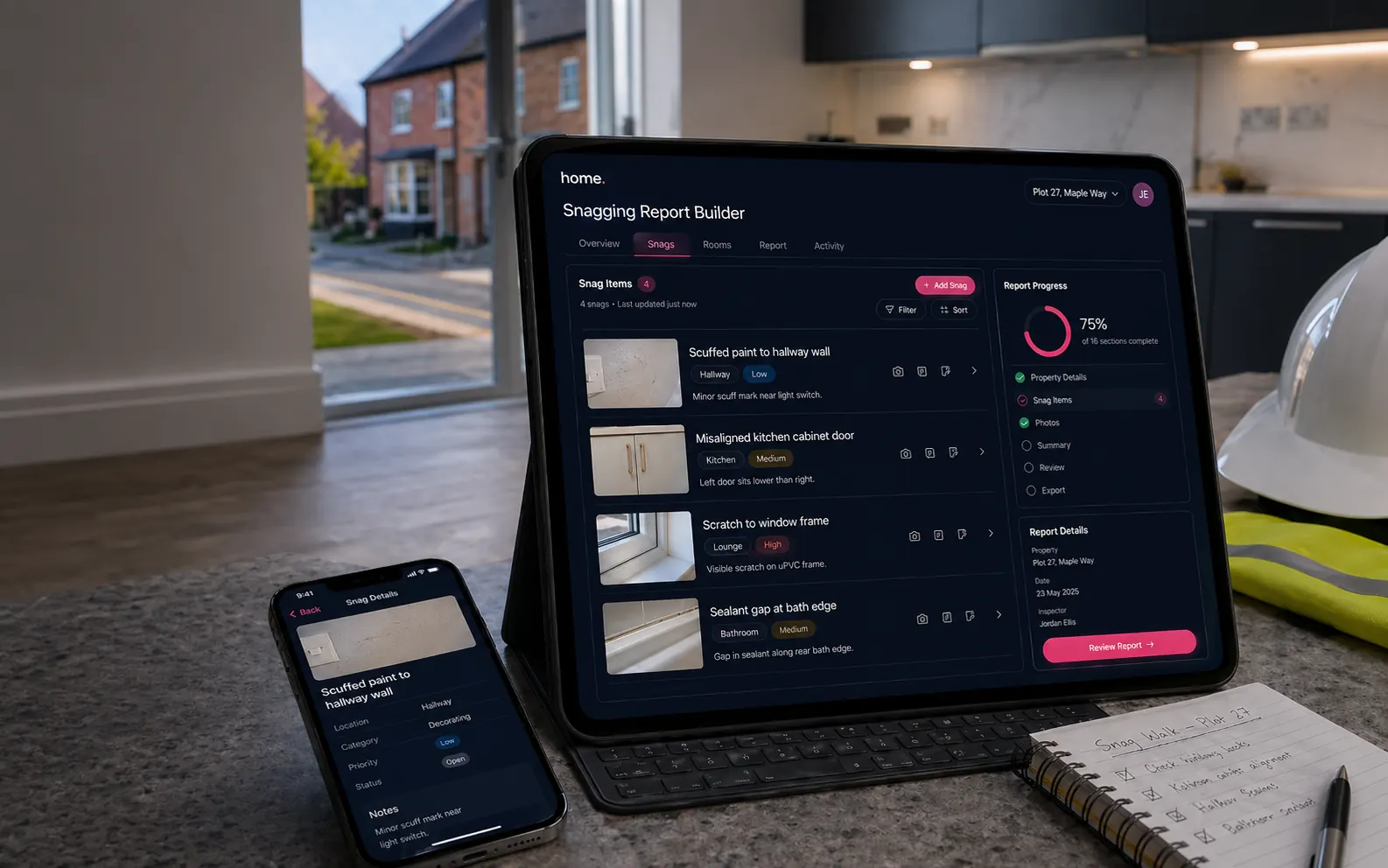
A new-build snag list is a list of dozens of small defects, each tied to a room, a photo and a developer action. The RICS condition-rating model doesn't fit. A spreadsheet doesn't render to a useful PDF. The Snagging Report Builder is built around how the punch list actually works.
By location, not element
A surveyor walks a new-build room by room. Defects are organised by Kitchen, Bathroom 1, Master Bedroom, External — not by D2 Roof Coverings. The data model matches the walk.
Status, not just rating
Snags have a lifecycle: Pending → In Progress → Resolved. The same report carries the full remediation history through multiple visits without losing the original list.
Developer-shaped output
The PDF is structured so each developer trade can find their snags fast — joiner, plasterer, electrician — not so a buyer can read 150 paragraphs of survey prose.
The workflow
Walk → snag → remediate → close
Designed around how new-build defects actually get tracked, not how a Word template imagines they do.
Walk
On-site walk-through with location-based recording: External, Ground Floor, First Floor, Kitchen, Bathrooms, Bedrooms, Lounge, Loft, Garage and any custom locations you add. Tap a location, log a snag, snap photos.
Capture
Each snag: description, location, sub-location, urgency (Low / Medium / High / Critical), photos (no limit), contractor notes, optional reference code. HEIC photos auto-converted server-side.
Track
Mark snags as Pending / In Progress / Resolved. Track who fixed it and when. Re-walk and re-capture as remediation proceeds across multiple developer visits.
Close
Generate a final PDF showing remaining snags vs. resolved snags, grouped by location, with photo evidence per defect. Buyer signs off; developer settles their punch list.
Site mode · phone-first
Built for the property, not the desk.
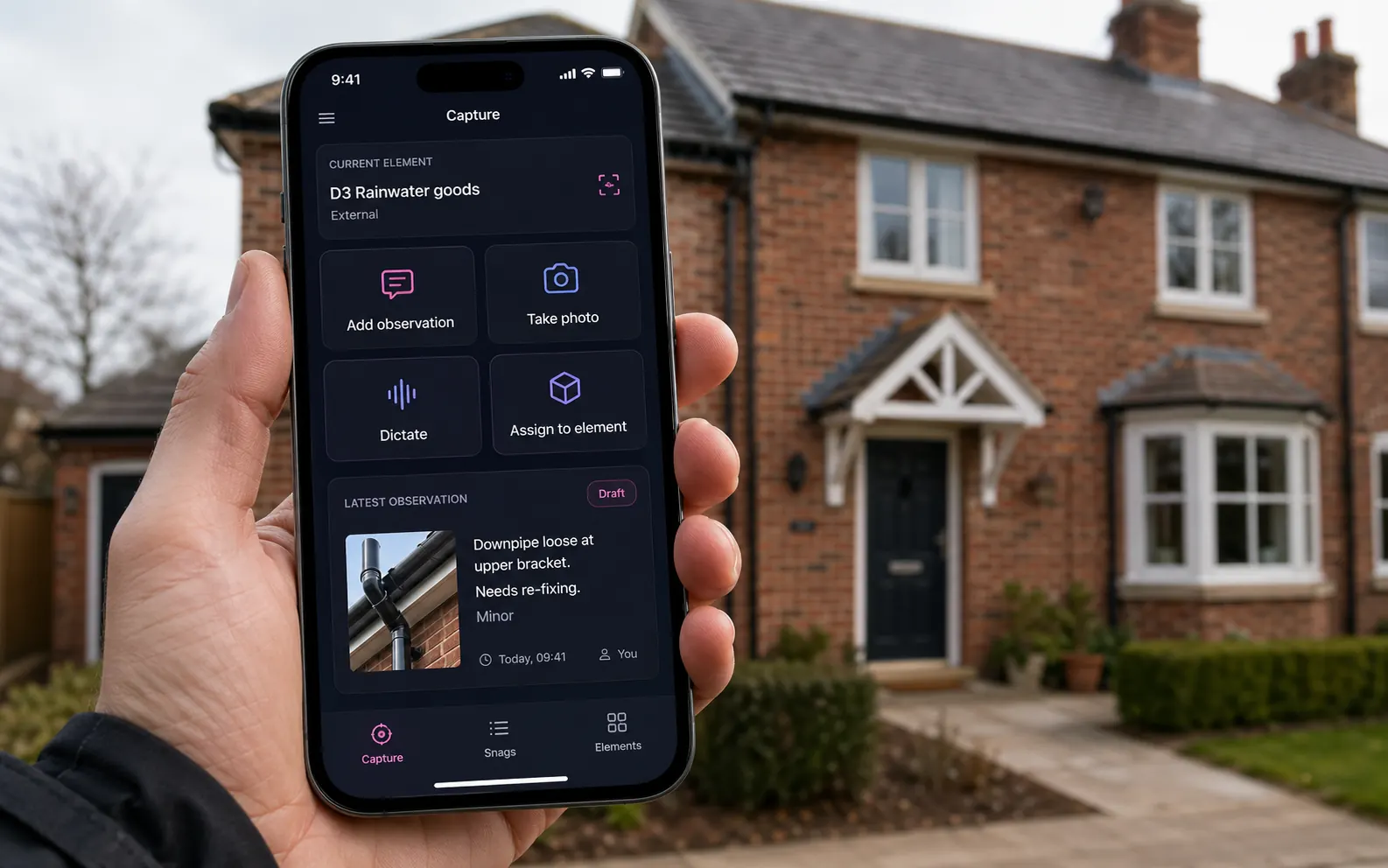
Site mode pins you to the current element so every observation, photo and dictation flows straight to the right snag without you re-tagging anything. Add observation. Take photo. Dictate. Assign to element. Four taps cover 95% of what you do on-site.
- ●Current element pinned at the top — no manual re-selection
- ●Latest observation card shows what you just captured
- ●Tab bar: Capture / Snags / Elements — three views, one tap apart
- ●Works offline — uploads on reconnect
What makes it different
Ten things you won't get from a spreadsheet template.
Tablet-and-phone-first
Designed for inspection in the property, not at a desk. Locations and snags add in two taps. Camera-roll integration. Phone view shows snag detail; tablet view shows the full list with photos.
No photo limit per snag
Snap as many shots as you need — wide shots, close-ups, ruler-for-scale, before-and-after. All grouped under the snag in the PDF appendix.
Urgency grading
Low / Medium / High / Critical with colour-coded badges throughout. The PDF leads with Critical and High so the developer can triage. Filterable in the UI.
Status lifecycle
Pending → In Progress → Resolved with timestamps and contractor notes. Re-issue the same report through multiple visits without starting over.
Re-walk friendly
Add new snags discovered on a remediation visit. Mark resolved snags as such (with date and contractor). The PDF can show "remaining vs resolved" or just remaining.
Custom locations
Pre-defined locations cover 95% of properties; bespoke layouts (basements, annexes, party walls) accept fully custom locations and sub-locations.
Plot & developer metadata
Plot number, site name, developer, site manager, build stage, handover date — captured once and stamped onto every PDF. No re-keying for each report.
Inspection metadata
Inspection date, inspector name + RICS number, weather conditions, access notes, inspection type (pre-completion / 2-year warranty / 11-month / etc.), limitations.
Optional warranty schema
Tick the warranty provider (NHBC, LABC, Premier Guarantee, ICW) and the report formats with the right cover-letter framing for each scheme.
Word export when needed
Default export is branded PDF. Word export is available for firms that need to send editable .docx to developer site teams who refuse to read a PDF.
Built-in locations
A defect always has a location
Pre-defined locations cover 95% of inspections. Add custom locations and sub-locations for unusual layouts.
The time saving
Faster on-site capture. Same-day delivery.
Numbers below are typical for a four-bed new-build pre-completion inspection with 30–60 snags.
| Step | Snagging Report Builder | Spreadsheet + Word |
|---|---|---|
| On-site capture (40 snags) | ~75 min | 90–120 min |
| Photo organisation | In-line, automatic | 30–60 min after the visit |
| Report formatting | One click | 45–90 min in Word |
| Re-walk update | Edit existing report | Re-author from scratch |
| Status tracking across visits | Built-in lifecycle | Manual columns |
| Same-day delivery | Realistic | Rare |
What goes in
Everything a developer or warranty provider needs to act
Property metadata
- ●Address & postcode
- ●Plot number
- ●Site name
- ●Developer
- ●Site manager
- ●Property type
- ●Build stage / handover date
Inspection metadata
- ●Inspection date
- ●Inspector name + RICS number
- ●Weather conditions
- ●Access notes
- ●Inspection type (pre-completion / 11-month / 2-yr warranty)
- ●Warranty provider (NHBC / LABC / Premier Guarantee / ICW)
- ●Limitations
Per-snag detail
- ●Description
- ●Location + sub-location
- ●Urgency (Low → Critical)
- ●Multiple photos with captions
- ●Contractor / warranty notes
- ●Status + resolved date
- ●Reference code (optional)
FAQ
Snagging FAQs
What is a snagging report?
A snagging inspection identifies defects ("snags") in a new-build home before the buyer accepts the keys or before the developer's defect-liability period ends. The report lists each defect with location, photo evidence, urgency and recommended remedial action — used by the buyer to challenge the developer.
Who reads a snagging report?
The buyer (the snagging inspector's client), the developer, the site manager, often a solicitor and sometimes a warranty provider (NHBC, LABC, Premier Guarantee). The PDF is structured so each party can find what they need without re-reading the whole document.
Can I re-inspect and re-issue?
Yes. The same report supports multiple visits — mark snags as resolved, add new ones, re-issue the PDF. The status lifecycle (Pending → In Progress → Resolved with date) means a single report can carry the full remediation history.
Is there a limit on photos?
No fixed limit per snag or per report. All photos go into the PDF appendix grouped by snag, so a single critical defect can carry ten photos if needed.
Does the snagging tool use AI?
The current snagging builder is rule-based — no AI in the data path. AI assistance for snagging description writing and image categorisation is on the roadmap; at present, the editor focuses on speed and clarity.
Can I export to Word?
Default export is branded PDF. Word export is available for firms that need to send editable .docx to developer site teams who prefer to mark up the document and email it back.
Does it work on a phone?
Yes. The capture interface is designed for tablet and phone first — desk view is the after-the-walk review. The phone view shows snag detail (photos, urgency, status); the tablet view shows the full list.
Can buyers see the report online?
Yes — every generated report has a secure share link the buyer can open without an account. The link can be revoked at any time.
More tools
Explore the rest of the surveyor toolkit
Otto
AI auto-mode RICS report writer
Dictate on-site, upload photos, get a finished, fully-routed Level 2 or Level 3 report in minutes.
Level 2 Report Writer
RICS Home Survey Level 2
Field-by-field RICS Level 2 reports with inline AI suggestions, image gallery, comparables and one-click branded PDF.
Level 3 Report Writer
RICS Building Survey Level 3
Comprehensive Level 3 Building Survey reports with deep technical sections, custom rating scales and AI legal-adviser notes.
Surveyor Comparable Tool
Sold + rental comps in one click
Auto-fetch sold and rental comparables within a 1-mile radius, weighted valuation range, branded PDF appendix for any survey.
AI Dictation
Voice-to-fields routing
Speak observations on-site; AI routes every sentence to the correct RICS field with confidence scores and replayable audio.
Image AI
Auto-categorise survey photos
Upload up to 200 photos; vision AI tags each to the right RICS element, rates condition, extracts defects and picks the best 35 for the report.
Style Profile
Your firm's writing fingerprint
Teach the AI to write like your firm — upload past reports, the AI extracts a 25-dimension writing fingerprint and applies it to every future auto-mode report.
Property Viewer
Pre-survey property intelligence
Look up any UK property and instantly see EPC, energy renovation costs, broadband coverage, environmental risks (flood, radon, mining, landfill), invasive plants, sales history and listing status — all in one dashboard.
Property Data Drawer
EPC + risks + comps in one panel
Open the property data drawer in any report to see EPC, environmental risks, listing history and comparables — copy-paste ready.
Standard Phrases
Reusable language library
Personal, firm-wide and industry-preset phrase libraries — insert with one click and use to train AI routing for voice consistency.
RICS Standards Check
Home Survey Standard compliance pass
One-click AI compliance pass against the RICS Home Survey Standard — flags missing content, weak ratings and structural gaps before you sign the report.
Free directory listing. Pay-as-you-go toolkit.
Every RICS-regulated surveying firm gets a verified profile, direct bookings from home.co.uk consumers and the surveyor toolkit included with the account. No subscription. No pay-per-lead. No commission on the job. Pay only when you use the premium AI tools.
2 minute setup · Verified against the RICS register · Trusted UK property platform since 1995